Best OCR for Scanned PDFs: 8 Free Tools Compared
Short answer
To OCR a scanned PDF and get a searchable PDF back, FastOCR (we make it) takes the file with a free account and also returns text, Word and Markdown. For a quick OCR scanned PDF job without an account, PDF24 and Sejda return a searchable PDF, while Google Drive gives you a Google Doc instead. We scored only Arabic and English, and only from images.
By the FastOCR team · Updated 4 November 2026 · Accuracy test run 31 October 2026
We make FastOCR. Accuracy figures come from our own test of each tool we scored, ours included, on the same scans; other facts link to each tool's own pages. How we tested
Try it here
Drop your file here
PDF, PNG, JPG, WebP, BMP, HEIC
PDF up to 1 GB · images up to 20 MB
Tips for a clear photo
- Lay the page flat.
- Use even light, with no shadows.
- Turn off the flash to avoid glare.
- Fill the frame with the page.
Verdict
Pick FastOCR if
- Your scanned PDF is Arabic, Urdu, Chinese or another non-Latin script, and you want a searchable PDF whose text copies in the right order.
- You want one upload to return a searchable PDF, plain text, Word and Markdown, with the language detected for you.
- You would rather the file never leave your computer: the free Mac and Windows apps (public beta) work offline.
Pick another tool if
- You have a short Latin-script PDF and want a searchable copy with no account at all: PDF24, or Sejda inside its stated free limit.
- You work in Google Docs and want an editable Google Doc from a small file: Google Drive.
- You want a free API to prototype with: OCR.space offers one, with limits on PDFs.
Best for
- A scanned PDF in Arabic, Urdu, Chinese or another script, returned as a searchable PDF: FastOCROur tool
FastOCR detects the language itself and the PDF needs a free account. On our Arabic page it got 2.6% of the characters wrong, against 35.5% for PDF24 (lower is better).
- A short scanned PDF, no account, searchable PDF out:
- A small scan you want as an editable Google Doc: Google Drive
The help page says to keep the file at 2 MB or smaller, and that tables and columns are not likely to be detected.Source
- Plain text or a searchable PDF from a file within a stated free limit:
- A free API to prototype with:
- PDFs you already process in a PDF toolkit:
- You already hold an Adobe account and your PDF is in a Latin script: Adobe Acrobat online
The tool runs before sign-in, but you sign in to download the searchable PDF.Source
- A one-off file where the free download allowance is enough:
Comparison table
| Tool | Sign-in | Limits it states | What comes back | How long it says it keeps files | Our scan test: Arabic / English (% wrong, lower is better) |
|---|---|---|---|---|---|
| FastOCR (our tool)Our tool | Sign-inPDFs: free account. Images: none. | Limits it statesFree monthly page allowance; see pricing. | What comes backSearchable PDF, text, Word, Markdown | How long it says it keeps filesEncrypted in transit and at rest, then auto-deleted; see privacy. | Our scan test: Arabic / English (% wrong, lower is better)2.6% / 3.3% |
| PDF24 | Sign-inNo registrationSource | Limits it statesNo time restrictions; funded by adsSource | What comes backSearchable PDF (PDF or PDF/A)Source | How long it says it keeps filesDeleted after one hourSource | Our scan test: Arabic / English (% wrong, lower is better)35.5% / 10.1%Our test |
| Google Drive | Sign-inWorks from your Google DriveSource | Limits it statesFile 2 MB or smaller; text at least 10 pixels highSource | What comes backA Google DocSource | How long it says it keeps filesNot stated | Our scan test: Arabic / English (% wrong, lower is better)Not tested |
| iLovePDF | Sign-inThe page does not say whether OCR needs an accountSource | Limits it statesBasic plan: limited document processingSource | What comes backSelectable, searchable PDFSource | How long it says it keeps filesKept a maximum of 2 hoursSource | Our scan test: Arabic / English (% wrong, lower is better)Not tested |
| Adobe Acrobat online | Sign-inSign in to download the resultSource | Limits it statesNo numeric limit statedSource | What comes backSearchable PDFSource | How long it says it keeps filesDeleted unless you sign in to save itSource | Our scan test: Arabic / English (% wrong, lower is better)Not tested |
| OCR.space | Sign-inNo registration for the web toolSource | Limits it statesWeb tool: 5 MB per documentSource | What comes backText, JSON, searchable PDFSource | How long it says it keeps filesDeleted right after OCR; PDF link valid one hourSource | Our scan test: Arabic / English (% wrong, lower is better)2.9% / emptyOur test |
| Smallpdf | Sign-inNo signups, says the OCR pageSource | Limits it statesSome limits apply; daily download limit on the free planSource | What comes backSearchable PDF; Word through its converterSource | How long it says it keeps filesDeleted after one hour unless saved to an accountSource | Our scan test: Arabic / English (% wrong, lower is better)99.1% / not downloadedOur test |
| Sejda | Sign-inNo signupSource | Limits it states10 pages or 50 MB per task; 3 tasks an hourSource | What comes backSearchable PDF and/or plain textSource | How long it says it keeps filesDeleted after 2 hoursSource | Our scan test: Arabic / English (% wrong, lower is better)Not tested |
Why FastOCR
Scanned PDFs
Scanned PDF in, searchable PDF out; text copies in the right order, including right-to-left.
See Scanned PDFsLanguages
100+ languages, detected automatically, including mixed pages.
Share of characters wrong on our evidence scans (lower is better): Arabic 2.6%, Urdu 9.1%, Bengali 7.4%, Tamil 2.2%, Chinese 1.0%.
See LanguagesExports
Raw text, Word (.docx) and Markdown.
See ExportsOffline desktop apps
Free offline Mac and Windows apps (public beta): searchable PDF, text, Word and Markdown, nothing leaves your computer.
See Offline desktop apps
Proof
On our Arabic scan FastOCR got 2.6% of the characters wrong, PDF24 35.5% and Smallpdf 99.1%, lower is better. The scans went in as images, apart from Smallpdf's Arabic page, which we wrapped in a one-page PDF, so this checks recognition rather than PDF handling.

FastOCR
احسان اُس خدا کا کہ جس نے دریائے سخن کو اپنے ابر کرم سے گو ہر معنی بخشا اور زبان
کو واسطے اپنی
حمد کے گویا کیا اور پیغمبر آخرالزمان کو ہم گنہگاروں کی شفاعت کی اسے رحمتہ اللعالمین پیدا کیا کہ
PDF24 OCR
ْ سان نار نے یا ط نکر انارک ےکوی دز یمر
اسرےکو راو و نایا نکو سکیا رو ںکی شع ت وا لو سائن ال ٴ
یک جب سے ار و سال ام این دوائح کہانبىی ودب ےنکر کے سےرا% of characters wrong by script, lower is better
- FastOCR
- PDF24
- OCR.space Engine 3
- imagetotext.info
| Script | Character error rate by tool |
|---|---|
| Chinese | FastOCR 1.0% PDF24 3.2% OCR.space E3 no score |
| Tamil | FastOCR 2.2% PDF24 9.2% OCR.space E3 no score |
| Arabic | FastOCR 2.6% PDF24 35.5% OCR.space E3 2.9% imagetotext.info 2.9% |
| English | FastOCR 3.3% PDF24 10.1% OCR.space E3 no score |
| Bengali | FastOCR 7.4% PDF24 18.6% OCR.space E3 11.2% imagetotext.info 7.9% |
| Urdu | FastOCR 9.1% PDF24 69.0% OCR.space E3 19.6% imagetotext.info 9.2% |
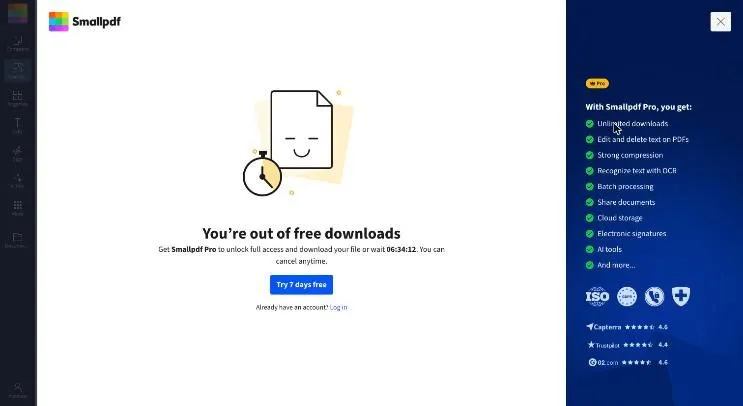
Smallpdf OCR, second download
 (opens full size)
Screenshot.
The dialog said
“You’re out of free downloads”
“Get Smallpdf Pro to unlock full access and download your file or wait 06:34:12.”
It appeared on our second download, with no sign-in and the free tool, on 31 October 2026.
FastOCR in any browser
- 1Open fastocr.org
- 2Drop in a photo
- 3Copy the text or download it
No account for 3 images a day. Sign in free for unlimited images.
What OCR on a scanned PDF has to do, and what we tested
A scanned PDF is a stack of page pictures with no text inside. OCR reads those pictures and either lays an invisible text layer over them, which gives a searchable PDF that still looks like the scan, or hands you the text on its own. Tools differ on which of these they return, so decide that first.
We ran one public-domain book page each in Arabic and English through the tools we could drive, and scored the text against the Wikisource transcription of the page. The score is the share of characters wrong, so lower is better, and gaps under three points are ties because the reference itself is imperfect.
The pages went in as images, not PDFs, with one exception noted in the proof below. Google Drive, iLovePDF, Adobe and Sejda were not run: the facts for those come from their own pages. Method, dates and the other scripts we tested are in the OCR accuracy comparison.
1. FastOCR (our tool)
- Best for
- A scanned PDF in any script that you want back as a searchable PDF, plus text, Word or Markdown.
- Watch out for
- PDFs need a free account. Translation and AI Polish work on finished single images, not PDFs.
Upload the file at Make PDF Searchable. FastOCR reads 100+ languages, works out the language itself, and returns a searchable PDF whose text copies in the right order, including right-to-left scripts. The website also offers text, Word and Markdown downloads.
Prefer to keep the file local? The free Mac and Windows apps are in public beta, run offline, and make searchable PDFs, text, Word and Markdown. They are OCR and export tools, not PDF editors.
In our scan test: 2.6% of the Arabic page's characters wrong and 3.3% of the English page (lower is better).
2. PDF24: free, no sign-up, language chosen by hand
- Best for
- A quick searchable PDF of a short, Latin-script document with no account.
- Watch out for
- You select the language yourself, and in our test it was well behind on the Arabic page.
PDF24 says no registration is required, that its tools are free thanks to advertising, and that files are deleted from its servers after one hour. The tool returns a searchable PDF, and you can join several files into one output.
Its language menu lists Arabic, Urdu, Bengali, Tamil, Chinese and more, but listing a language is not the same as reading it well: on our scans PDF24 got 35.5% of Arabic wrong and 10.1% of English (lower is better). See FastOCR and PDF24.
Source: PDF24 OCR PDF, checked 4 November 2026.
3. Google Drive: an editable Google Doc from a small file
- Best for
- Pulling the text of a small scanned PDF into a document you will edit.
- Watch out for
- You get a Google Doc rather than a searchable PDF, and its help page says tables and columns are not likely to be detected.
Google says you can convert multipage PDFs or photo files: put the file in Drive, right-click, and choose Open with Google Docs. The help page asks for a file of 2 MB or smaller, text at least 10 pixels high and pages that are right-side up, and says Drive detects the language.
The same page lists Arabic, Urdu, Persian, Hindi, Bengali, Tamil, Chinese and many more. We did not test it. A scanned book chapter will usually be over the size limit, so check that before planning around it. See FastOCR and Google Drive.
Source: Google Drive Help, checked 4 November 2026.
4. iLovePDF: OCR beside the rest of its PDF toolkit
- Best for
- Making a PDF searchable when you already use its merge, split and compress tools.
- Watch out for
- The Basic plan advertises limited document processing, and the page does not say whether OCR needs an account.
The OCR PDF page promises a selectable and searchable PDF, and its language list includes Arabic, Urdu, Persian, Hindi, Bengali, Tamil and Chinese. It says detection is more accurate when you select the document languages. The pricing page shows OCR PDF on Basic, with OCR PDF (Advanced) only on paid plans.
Its help page says files are kept for a maximum of two hours. We did not test it. See FastOCR and iLovePDF.
Source: iLovePDF OCR PDF, checked 4 November 2026.
5. Adobe Acrobat online: sign in to download
- Best for
- A Latin-script PDF when you already have an Adobe account.
- Watch out for
- The result needs a sign-in to download, the free tool takes PDFs only, and Adobe says handwritten text can reduce accuracy.
Adobe says the file is deleted unless you sign in to save it. The tool page names English, German, Spanish, French, Portuguese and more, and links to a fuller list, so check that list for your script before uploading. We did not test it.
Source: Adobe online OCR, checked 4 November 2026.
6. OCR.space: free web tool and API, two engines
- Best for
- A free API to prototype a pipeline.
- Watch out for
- Its default engine rejected the Arabic test page, and the free API plan limits PDFs to 3 pages with a watermark on searchable PDFs.
The web tool takes PDFs and images, needs no registration and deletes files right after OCR. In our run the second engine got 2.9% of Arabic wrong (lower is better), while the default engine rejected Arabic and got 4.5% on English. Choose the engine by hand. See FastOCR and OCR.space.
Source: OCR.space, checked 4 November 2026. The API limits are on its plans page.
7. Smallpdf: clean page, daily download limit
- Best for
- A single file when you have not used up the free allowance.
- Watch out for
- Its pricing page lists a daily download limit on the free plan, and in our test the limit arrived after one result.
Smallpdf accepts PDFs, offers a searchable PDF and says files are deleted after one hour unless you save them to an account. It has no language menu. Our one Arabic run got 99.1% of the characters wrong (lower is better), and then free downloads were used up, so the other pages were not scored. See FastOCR and Smallpdf.
Source: Smallpdf OCR, checked 4 November 2026.
8. Sejda: stated free limits and plain-text output
- Best for
- A short document where you want text or a searchable PDF and no account.
- Watch out for
- Free use is limited to one file per task and the page states a page and size ceiling; its language menu appears only after you upload.
Sejda lets you choose a searchable PDF, plain text or both, says files are deleted after two hours and permanently removed after processing, and recommends specifying the language. Paid web OCR raises the page limit. We did not test it.
Source: Sejda OCR, checked 4 November 2026.
Scan and settings tips that change the result
Resolution matters most. Scan at 300 dpi or higher; a photo taken on a phone needs even light and a steady hand. Straighten skewed pages, keep dark text on a light page, and crop away stains and margins that hold handwriting.
Choose the language the way the tool wants it. PDF24, iLovePDF and Sejda each say that picking the document language improves recognition, while FastOCR and Google Drive detect it. For right-to-left pages, paste a few lines of the output into a text editor and check that the first word sits at the right.
Open the result before you rely on it. Search for a number you can see on the page, and check amounts, dates and names by eye. For text you plan to edit rather than search, try PDF to Text or PDF to Word; to keep the scan and add a text layer, use Make PDF Searchable.
Where to go next
This page covers tools that take a scanned PDF file. For desktop suites and document types such as contracts or medical records, read Best OCR software for scanned documents. For photos, screenshots and free tools of every kind, see Best free OCR tools. Language-specific tools: Arabic OCR and Hindi OCR.
When another tool is the better choice
- Choose PDF24 or Sejda when the file is short, the script is Latin and you want a searchable PDF without an account.
- Choose Google Drive when an editable Google Doc matters more than keeping the scan, and the file is small.
- Choose OCR.space when you want a free API to prototype with and will pick the engine by hand.
- Choose Tesseract, which is free and open source, when you want to script OCR on your own machine and are happy to install and tune a language pack.
FAQ
What is the best free OCR tool for scanned PDFs?
It depends on the file. For a non-Latin script or a PDF you will search and copy from, FastOCR (our tool) with a free account. For a short Latin-script file with no account, PDF24 or Sejda. For an editable Google Doc from a small file, Google Drive.
Can I make a scanned PDF searchable for free?
Yes. PDF24, Sejda, iLovePDF, Smallpdf, Adobe online and OCR.space all return a searchable PDF, each with its own limits or sign-in rule, and FastOCR does it with a free account. Open the result and search for a word you can see on the page.
How accurate is free OCR on scanned PDFs?
It varies by script. On our Arabic page FastOCR got 2.6% of characters wrong, PDF24 35.5% and Smallpdf 99.1% (lower is better). We scored two scripts from images and did not run Google Drive, iLovePDF, Adobe or Sejda.
Is there a free OCR tool that handles Arabic PDFs?
FastOCR detects Arabic automatically. PDF24, iLovePDF and Google Drive list it; Sejda shows its languages only after upload. A listed language is no promise: PDF24 got 35.5% of Arabic wrong on our page, where FastOCR got 2.6% (lower is better).
What is the difference between a searchable PDF and text extraction?
A searchable PDF keeps the scanned page image and adds an invisible text layer, so you can search and copy while the page looks unchanged. Text extraction returns only the words, which suits editing and pasting but drops the original page appearance.
How long do these sites keep my scanned PDF?
Each says so differently: PDF24 and Smallpdf one hour (Smallpdf unless you save the file), iLovePDF a maximum of two hours, Sejda two hours, OCR.space immediately after OCR, and Adobe until you sign in to save. Google Drive does not state a period.
Can I OCR a scanned PDF without uploading it?
Yes. FastOCR's free Mac and Windows apps are in public beta and make searchable PDFs, text, Word and Markdown on your own computer, using the recognition built into macOS and Windows. Tesseract is free and open source but you run it from the command line.
Method
Vendor facts here come from each vendor's own pages, read on 4 November 2026. Anything a page leaves out appears as Not stated, never as No. Accuracy is the share of characters wrong against the Wikisource transcription, lower is better, on one public-domain scanned page each of Arabic and English. Other tools ran on 31 October 2026 on free tiers with the 1,280-pixel image; FastOCR's output is from 25 October 2026, with the Arabic and English scans at 500 pixels. The scans went in as images; PDF24 took JPG files and we read its text from the downloaded searchable PDF, and Smallpdf received the Arabic scan wrapped in a one-page PDF. OCR.space ran on its public demo key, so its empty English result on the second engine may be rate limiting. Google Drive, iLovePDF, Adobe and Sejda were not run. One page per script is a small sample, so run your own files before choosing.
Change log
- 15 March 2026: First published.
- 1 November 2026: Added the Arabic and English scan results.
- 4 November 2026: Rewritten around what each tool returns, its stated limits and file retention; added Sejda and rechecked every vendor page.