PDF24 OCR online: what it does, and a free PDF24 alternative
Short answer
PDF24 OCR is the free OCR PDF tool at tools.pdf24.org, also typed as PDF 24 OCR, OCR 24 or pdf24ocr. It needs no registration, states no usage cap, has you pick one of about 120 languages by hand, and returns a searchable PDF or PDF/A. FastOCR (we make it) is a free alternative that also shows the text, gives Word and Markdown, and detects the language itself.
By the FastOCR team · Updated 4 November 2026 · Accuracy test run 31 October 2026
We make FastOCR. Accuracy figures come from our own test of each tool we scored, ours included, on the same scans; other facts link to each tool's own pages. How we tested
Try it here
Drop your file here
PDF, PNG, JPG, WebP, BMP, HEIC
PDF up to 1 GB · images up to 20 MB
Tips for a clear photo
- Lay the page flat.
- Use even light, with no shadows.
- Turn off the flash to avoid glare.
- Fill the frame with the page.
Verdict
Pick FastOCR if
- You want the recognized text on screen to check and copy, plus Word (.docx) and Markdown files, not only a PDF.
- Your page is Arabic or Urdu. PDF24 got 35.5% and 69.0% of characters wrong on our pages; FastOCR got 2.6% and 9.1% (lower is better).
- You do not know the language, or one page mixes scripts. FastOCR detects it; PDF24 asks you to choose from a menu.
- You also want translation, AI Polish, an API, or bank statements in Excel.
Pick PDF24 if
- You make whole scanned PDFs searchable and never want an account, for PDFs too.
- You need PDF/A for an archive, or several files joined into one searchable output.
- You want files deleted after one hour from servers in Germany.
FastOCR and PDF24 side by side
| Factor | FastOCR | PDF24 |
|---|---|---|
| Account to start | FastOCRNone for images. A free account for PDFs. | PDF24"No registration required"Source |
| Free limit, as advertised | FastOCRA small daily image cap without an account; signing in lifts it. See pricing. | PDF24No numeric cap stated; "use all PDF24 features as often as you like"Source |
| Outputs | FastOCRText on screen, searchable PDF, Word (.docx), Markdown | PDF24Searchable PDF or PDF/ASource |
| Choosing the language | FastOCRDetected automatically, including mixed pages | PDF24Picked by hand from a menu; the page does not mention auto-detectionSource |
| Languages listed | FastOCR100+ languages | PDF24About 120 menu entries, including Arabic, Urdu, Persian, Hindi, Bengali, Tamil, Chinese, Japanese, Korean, Thai and HebrewSource |
| Watermark on free output | FastOCRNone on text, Word or searchable PDF | PDF24Not statedSource |
| Several files at once | FastOCRBatch upload for PDFs on paid plans | PDF24Can join files into a single output fileSource |
| How it is paid for | FastOCRFree tier, with paid plans and page packs for more PDF pages | PDF24"100% free thanks to advertising"Source |
| Your files | FastOCRRead on our servers; the privacy policy covers retention. The free PDF tools never upload. | PDF24Deleted from its servers after one hour; servers in GermanySource |
| Share of characters wrong on the six scanned pages shown (lower is better) | FastOCR1.0% (Chinese) to 9.1% (Urdu) | PDF243.2% (Chinese) to 69.0% (Urdu)Our test |
Why FastOCR
Photos and screenshots
Every image upload gets raw text and a single-page searchable PDF, plus Word and Markdown.
See Photos and screenshotsScanned PDFs
Scanned PDF in, searchable PDF out; text copies in the right order, including right-to-left.
See Scanned PDFsExports
Raw text, Word (.docx) and Markdown.
See ExportsLanguages
100+ languages, detected automatically, including mixed pages.
Share of characters wrong on our evidence scans (lower is better): Arabic 2.6%, Urdu 9.1%, Bengali 7.4%, Tamil 2.2%, Chinese 1.0%.
See LanguagesAlso free
Free browser PDF tools (merge, compress, split, sign; files stay in the browser), and bank statements to Excel, CSV and QuickBooks.
See Also free
Proof
On the six scripts shown (Arabic, Urdu, Bengali, Tamil, Chinese and English), PDF24 had more characters wrong than FastOCR on every page, and only Chinese was within the noise (lower is better).

FastOCR
احسان اُس خدا کا کہ جس نے دریائے سخن کو اپنے ابر کرم سے گو ہر معنی بخشا اور زبان
کو واسطے اپنی
حمد کے گویا کیا اور پیغمبر آخرالزمان کو ہم گنہگاروں کی شفاعت کی اسے رحمتہ اللعالمین پیدا کیا کہ
PDF24 OCR
ْ سان نار نے یا ط نکر انارک ےکوی دز یمر
اسرےکو راو و نایا نکو سکیا رو ںکی شع ت وا لو سائن ال ٴ
یک جب سے ار و سال ام این دوائح کہانبىی ودب ےنکر کے سےرا% of characters wrong by script, lower is better
- FastOCR
- PDF24
- OCR.space Engine 3
- imagetotext.info
| Script | Character error rate by tool |
|---|---|
| Chinese | FastOCR 1.0% PDF24 3.2% OCR.space E3 no score |
| Tamil | FastOCR 2.2% PDF24 9.2% OCR.space E3 no score |
| Arabic | FastOCR 2.6% PDF24 35.5% OCR.space E3 2.9% imagetotext.info 2.9% |
| English | FastOCR 3.3% PDF24 10.1% OCR.space E3 no score |
| Bengali | FastOCR 7.4% PDF24 18.6% OCR.space E3 11.2% imagetotext.info 7.9% |
| Urdu | FastOCR 9.1% PDF24 69.0% OCR.space E3 19.6% imagetotext.info 9.2% |
PDF24 OCR: where it is and what it does
PDF24's OCR tool is the OCR PDF page at tools.pdf24.org/en/ocr-pdf, one of the free PDF24 Tools. You drop in a scan, pick the recognition language from a menu, and download a searchable PDF or PDF/A. The page says no registration is required and that you can use every PDF24 feature as often as you like, with no time restrictions; it names no file size, page or daily cap. Ads pay for it. PDF24 says files are deleted from its server after one hour and that its servers are in Germany. The same page links to a desktop app download.
Its language menu has about 120 entries. Eleven of them are languages in non-Latin scripts we looked for: Arabic, Urdu, Persian, Hindi, Bengali, Tamil, Chinese, Japanese, Korean, Thai and Hebrew. You choose one by hand, and the page says nothing about detecting it for you. In our run it accepted JPG scans, had deskew on by default, and can join several files into one output. It does not say whether free output carries a watermark.
A free PDF24 alternative: what FastOCR adds
FastOCR, a free PDF24 alternative for OCR online, shows the recognized text next to the page, so you can check and copy it before you download anything. One image upload returns raw text, a single-page searchable PDF, Word (.docx) and Markdown. A scanned PDF comes back searchable, and its text copies in reading order, right-to-left Arabic and Urdu included. You never pick a language: it detects 100+ languages, including pages that mix scripts. Images need no sign-up and get no watermark; PDFs need a free account.
Beyond OCR there is translation and AI Polish for the text of a finished image, a REST API, Python SDK and MCP server, free offline Mac and Windows apps (public beta), a Chrome extension that copies text from anything on screen, free PDF tools that run in your browser (merge, split, compress, sign and more) and bank statements to Excel, CSV and QuickBooks. The desktop apps read text with the recognition built into macOS and Windows, so the accuracy figures on this page do not apply to them. The browser PDF tools need no account, and your file never leaves your device.
Photo of a page
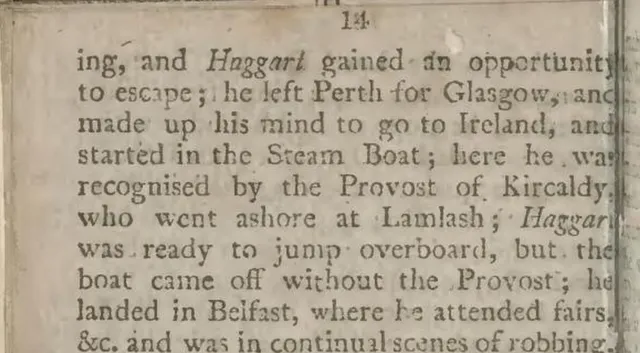 (opens full size)
Text FastOCR returned
ing, and Haggart gained an opportunity
to escape; he left Perth for Glasgow, and
made up his mind to go to Ireland, and
started in the Steam Boat; here he wa
recognised by the Provost of Kircaldy
who went ashore at Lamlash; HaggarPDF24 OCR accuracy: how it did on six scripts
PDF24 OCR did not beat FastOCR on any of the six scanned pages shown (Arabic, Urdu, Bengali, Tamil, Chinese and English), and only Chinese was within noise. We scored character error rate, the share of characters wrong, missing or extra, so lower is better. Its best pages were Chinese (3.2% against FastOCR's 1.0%), Tamil (9.2% against 2.2%) and English (10.1% against 3.3%).
It struggled on right-to-left pages, with the language set by hand: Arabic 35.5% against 2.6%, Urdu 69.0% against 9.1%. Bengali was 18.6% against 7.4%. Lower is better throughout.
FastOCR read the Arabic, Urdu and English pages from smaller 500-pixel copies, while PDF24 got 1,280 pixels, so those three gaps are not down to image size.
Smallpdf vs PDF24 on OCR accuracy: we have one page to compare. Smallpdf's Arabic result came back as Latin letters, 99.1% of characters wrong against PDF24's 35.5% (lower is better). Smallpdf then said we were out of free downloads, so its other pages have no score. See FastOCR vs Smallpdf.
How we tested PDF24
Pages: public-domain book scans from Wikimedia Commons, one per script. This page shows six of them (Arabic, Urdu, Bengali, Tamil, Chinese and English). Reference: each page's Wikisource transcription. We dropped spaces, punctuation and Arabic diacritics before scoring. That reference is itself 1% to 6% off a hand-proofread key, so treat gaps under about 3 points as a tie. See the full benchmark.
PDF24 run: the free OCR PDF tool, no sign-in, on 31 October 2026. Default settings (PDF output, deskew on), each scan uploaded as a JPG, the OCR language chosen by hand for each run. We pulled the text out of the downloaded searchable PDF with pdftotext. PDF24 names no OCR engine, so we name none.
FastOCR run: output from the live API on 25 October 2026. Smallpdf ran on 31 October 2026 with no sign-in; it has no language menu. Facts about PDF24's features come from its OCR page, checked on 4 November 2026. Scans: Wikimedia Commons. Text: Wikisource.
Choose PDF24 if
- You OCR whole scanned PDFs and want no account at all; FastOCR asks for a free one for PDFs.
- You need PDF/A output for an archive.
- You want many files joined into one searchable PDF in a single run.
- Your scans are printed Chinese, Tamil or English and a searchable PDF is all you need; PDF24 got 3.2% (Chinese) to 10.1% (English) of characters wrong on those pages (lower is better).
- You want files kept on servers in Germany and deleted after an hour.
FAQ
Where is PDF24's OCR tool?
It is the OCR PDF tool at tools.pdf24.org/en/ocr-pdf, free and with no registration. You upload a scan, choose the language from a menu and download a searchable PDF or PDF/A. The same page offers a PDF24 desktop app download.
Is PDF24 OCR free, and is there a limit?
Yes, it is free. PDF24 says advertising pays for it, no registration is needed, and you can use its features as often as you like. Its OCR page states no file size, page or daily cap, and it does not mention watermarks either way.
Does PDF24 OCR give you text or a Word file?
Its page lists PDF and PDF/A as outputs, so you copy text out of the searchable PDF. FastOCR shows the text on screen and gives Word (.docx), Markdown and a searchable PDF from the same upload.
How accurate is PDF24 OCR?
On the six scanned pages shown it got 3.2% (Chinese) to 69.0% (Urdu) of characters wrong; lower is better. Chinese, Tamil and English were its best pages, and Arabic and Urdu its worst. FastOCR was lower on all six, with Chinese inside the noise.
Smallpdf vs PDF24: which is more accurate for OCR?
We could score Smallpdf on one page only. On Arabic it got 99.1% of characters wrong and PDF24 35.5% (lower is better). Smallpdf then said we were out of free downloads, so its other pages have no Smallpdf score.
Does PDF24 OCR detect the language?
Its page does not say it does. You choose the language from a menu of about 120 entries, and we set it by hand for each run. FastOCR detects the language itself, including pages that mix two scripts.
Is FastOCR a good PDF24 alternative?
Yes, when you want the text and not only a PDF, or when the page is Arabic, Urdu or Bengali. Images need no sign-up. PDF24 stays the simpler choice for many scanned PDFs with no account, or for PDF/A.
Method
PDF24 facts come from its OCR page, checked on 4 November 2026; anything the page does not state is shown as Not stated, never as No. Accuracy is the share of characters wrong against the Wikisource text, lower is better, on one public-domain scan per script shown, run on 31 October 2026. Every tool shown here with a percentage was run on the same scans; other facts come from vendor pages. Details are in how we tested.
Change log
- 20 July 2026: First published.
- 31 October 2026: Added the accuracy test of PDF24.
- 4 November 2026: Moved to the comparison template; re-checked PDF24's OCR page and added what FastOCR offers beyond OCR.