Extract PDF Text for AI & LLMs
Convert scanned PDFs into downloadable text or Markdown for AI workflows. FastOCR extracts the document’s text so you can inspect it before using it in ChatGPT, Claude or Gemini. PDF processing requires an account and uses your document-page allowance. Review the extracted text against the scan before relying on it.
Review the reproducible worked example below to see a real 1943 archival scan, its exact extracted Markdown, and a source-checking prompt you can run directly in ChatGPT, Claude, or Gemini.
Markdown Paragraphs
Download the extracted words as a Markdown file of paragraphs. PDF pages include page comments when boundaries are verified. Headings, table grids, pictures, and charts are not synthesized.
1-Click Copy for Prompts
Instantly copy formatted text blocks to paste directly into ChatGPT, Claude, or Gemini prompt windows.
Inspect Before Ingestion
Review numbers, proper names, and dates against the original scan before feeding text into language models or RAG vector databases.
Worked Example: Scanned PDF to Markdown
Compare the original archival scan against the actual Markdown text extracted by FastOCR, then test the prompt below in your AI assistant.
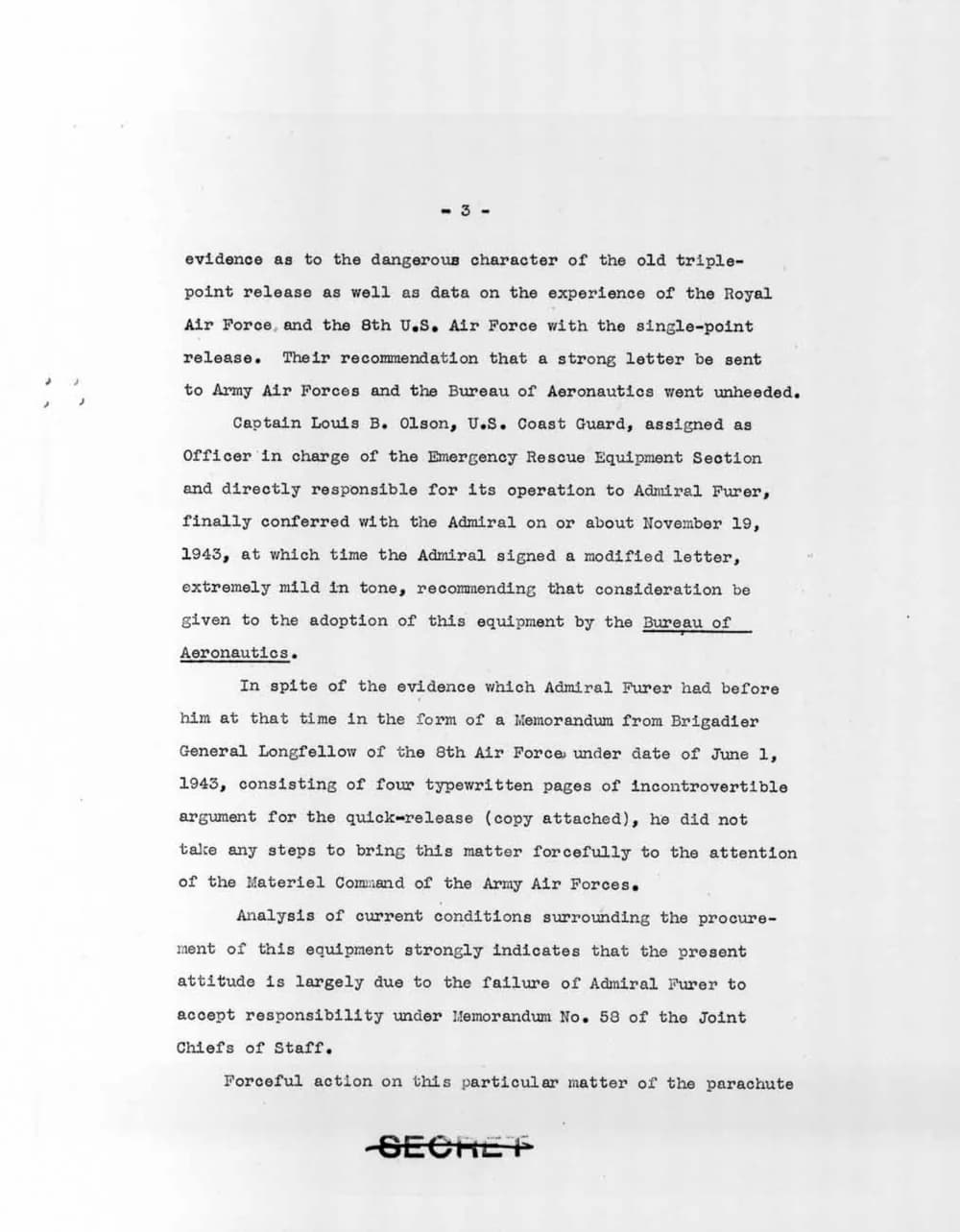
Emergency Rescue Equipment Section Report (Nov 1943, public domain).
-3-

evidence as to the dangerous character of the old triple-point release as well as data on the experience of the Royal Air Force, and the 8th U.S. Air Force with the single-point release. Their recommendation that a strong letter be sent to Army Air Forces and the Bureau of Aeronautics went unheeded.

Captain Louis B. Olson, U.S. Coast Guard, assigned as Officer in charge of the Emergency Rescue Equipment Section and directly responsible for its operation to Admiral Furer, finally conferred with the Admiral on or about November 19, 1943, at which time the Admiral signed a modified letter, extremely mild in tone, recommending that consideration be given to the adoption of this equipment by the Bureau of Aeronautics.

In spite of the evidence which Admiral Furer had before him at that time in the form of a Memorandum from Brigadier General Longfellow of the 8th Air Force under date of June 1, 1943, consisting of four typewritten pages of incontrovertible argument for the quick-release (copy attached), he did not take any steps to bring this matter forcefully to the attention of the Materiel Command of the Army Air Forces.

Analysis of current conditions surrounding the procure-ment of this equipment strongly indicates that the present attitude is largely due to the failure of Admiral Furer to accept responsibility under Memorandum No. 58 of the Joint Chiefs of Staff.

Forceful action on this particular matter of the parachute

SECRET
Paragraph reflow preserved. Headings, tables, and images are not synthesized.
Source-Checking Prompt
Paste this prompt alongside the extracted Markdown into ChatGPT, Claude, or Gemini:
Using only the supplied text, identify the officer named in the document, the date of his meeting, and the equipment discussed. Quote supporting text for each answer. If an answer is missing, say so.
Verifiable Answers (Ground Truth in Scan):
- Officer named: Captain Louis B. Olson, U.S. Coast Guard (Officer in charge, Emergency Rescue Equipment Section). Also mentions Admiral Furer and Brigadier General Longfellow.
- Date of meeting: "on or about November 19, 1943" (conferred with Admiral Furer).
- Equipment discussed: Parachute release equipment—comparing the "old triple-point release" with the "single-point release" / "quick-release".
3 Simple Steps to Feed Scanned PDFs to AI
Upload Scanned PDF
Go to FastOCR's PDF to Markdown uploader and select your scanned document.
Extract Text & Markdown
FastOCR parses document pages, recognizes multilingual text, and generates downloadable text or Markdown paragraphs.
Inspect & Prompt AI
Review the extracted text against your original scan, then copy or paste the text directly into ChatGPT, Claude, or Gemini prompts.
Frequently Asked Questions
Why convert a scanned PDF to Markdown or text instead of uploading the PDF directly to an AI?
While some multimodal models like Gemini can process PDF pages visually, visual ingestion does not let you inspect, search, or edit the raw text before submitting it. FastOCR extracts the document's text as inspectable plain text or Markdown paragraphs. You can verify names, dates, numbers, and transcription accuracy against your original document before feeding the text to ChatGPT, Claude, or Gemini.
How does FastOCR format Markdown from scanned PDFs?
FastOCR extracts recognized lines into paragraphs with preserved text flow. Markdown output does not reconstruct headings, font styles, table grids, pictures, or charts. PDF pages include page comments when page boundaries are verified.
How do I extract text from a scanned PDF for Claude or ChatGPT?
1. Go to the PDF to Markdown tool (https://fastocr.org/pdf-to-markdown) and upload your scanned PDF. 2. FastOCR extracts the text across document pages into Markdown paragraphs. 3. Review the extracted text against the original scan, then copy or download the .md or .txt file to paste into ChatGPT, Claude, or Gemini.
Does FastOCR support large PDFs for AI analysis?
Yes. FastOCR supports scanned PDF files up to 1GB, making it easy to convert long books, research papers, legal documents, and contracts for LLM analysis. An account is required for PDF OCR, using your monthly document-page allowance.
Starting from a photo or screenshot? Use Image to Markdown. Need only plain text? Try PDF to Text.
Ready to Convert Your PDF for ChatGPT?
Upload your scanned document in PDF to Markdown and get clean, prompt-ready text.
Convert PDF to Markdown