Extract Text from Receipts
Snap a photo of a receipt and get structured text — vendor, date, items, tax, and total. Ready for expense reports or bookkeeping.
Upload a receipt →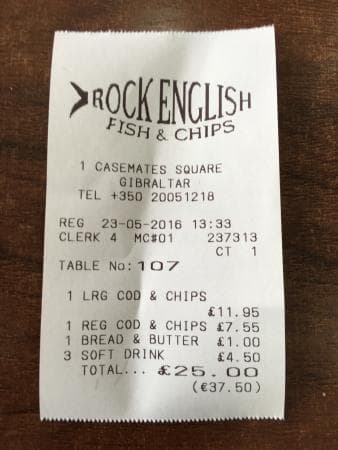
ROCK ENGLISH
FISH & CHIPS
1 CASEMATES SQUARE
GIBRALTAR
TEL +350 20051218

REG 23-05-2016 13:33
TABLE No: 107

1 LRG COD & CHIPS   £11.95
1 REG COD & CHIPS    £7.55
1 BREAD & BUTTER     £1.00
3 SOFT DRINK         £4.50
              ──────────
TOTAL...            £25.00
Any receipt format
Thermal paper, printed invoices, restaurant bills, gas station receipts.
Table structure preserved
Line items, quantities, and prices are extracted with spatial relationships intact.
Totals & tax
Subtotals, tax amounts, tips, and grand totals are recognized as distinct fields.
Dates & vendor info
Store name, address, date, and transaction ID are extracted.
Any language
Receipts in Arabic, Chinese, Japanese, European languages, and more.
Phone camera ready
Snap a photo — no scanner needed. Works with crumpled or faded receipts.
Frequently asked questions
What receipt formats work?
Photos (JPG, PNG, WebP) and scanned PDFs. You can snap a photo with your phone or upload a scanned image — both work equally well.
Does it extract line items and totals?
Yes. The AI recognizes tabular data including item names, quantities, prices, subtotals, tax, and totals with their spatial relationships preserved.
Can I process receipts in other languages?
Yes. Receipts in any of 100+ languages are supported, including Arabic, Chinese, Japanese, and European languages.
No registration required for images.