Best OCR Software for Scanned Documents in 2026: Free and Paid Tools Compared
Short answer
The best OCR software, like the best OCR scanner, depends on your files. For scans in many scripts we pick FastOCR (we make it): it detects 100+ languages and returns a searchable PDF, Word and Markdown. FastOCR got 9.1% of Urdu characters wrong, against 55.3% for Tesseract (lower is better). Among paid OCR scanning software, ABBYY FineReader PDF (198 languages listed) suits heavy desktop work.
By the FastOCR team · Updated 4 November 2026 · Accuracy test run 31 October 2026
We make FastOCR. Accuracy figures come from our own test of each tool we scored, ours included, on the same scans; other facts link to each tool's own pages. How we tested
Try it here
Drop your file here
PDF, PNG, JPG, WebP, BMP, HEIC
PDF up to 1 GB · images up to 20 MB
Tips for a clear photo
- Lay the page flat.
- Use even light, with no shadows.
- Turn off the flash to avoid glare.
- Fill the frame with the page.
Verdict
Pick FastOCR if
- Your scans are Arabic, Urdu, Bengali, Tamil, Chinese or English, or mix scripts on one page. FastOCR got 2.6% of our Arabic page and 9.1% of our Urdu page wrong, against 20.4% and 55.3% for Tesseract (lower is better).
- You want a searchable PDF that copies in reading order, plus Word and Markdown, without installing a suite.
- You want OCR software on a Mac or Windows PC that works offline and costs nothing (public beta).
- You are building software and want a REST API, a Python SDK or an MCP server for AI agents.
Pick another tool if
- You need recognition languages beyond ours or a desktop suite: ABBYY FineReader PDF lists 198 and Readiris 138.
- Your office already pays for Acrobat and your PDFs are in Latin script, Chinese or Japanese: Adobe Acrobat.
- You want an open-source library you host and control: Tesseract.
Best for
- Scans in many scripts, from a browser, an app or your own code: FastOCROur tool
One upload returns text, a searchable PDF, Word and Markdown, with 100+ languages detected automatically. On our scanned English page it got 3.3% of characters wrong, where Tesseract got 8.5% (lower is better).
- Heavy desktop work and the longest language list: ABBYY FineReader
Lists 198 recognition languages, makes searchable PDFs and converts many documents at once with the same settings. Paid subscription with a 7-day trial.Source
- PDFs in Latin script, Chinese or Japanese, in an office that already pays for Acrobat: Adobe Acrobat online
The free online tool makes a scanned PDF searchable; you sign in to download it, and paid plans start with Acrobat Standard.Source
- A one-time desktop licence instead of a subscription:
- Editing PDFs and running OCR in the same desktop app: PDFelement
A full PDF editor with two OCR modes, 'Searchable Text Image' and 'Editable Text'.Source
- Batch OCR inside a paid PDF editor for a team:
- Small files you will edit in Google Docs: Google Drive
Open a file with Google Docs and the text lands in a Doc. Files should be 2 MB or smaller.Source
- Text from a picture already in your notes: Microsoft OneNote
Right-click the picture and choose Copy Text from Picture.Source
- A few lines copied with an iPhone camera: Apple Live Text
Built into iPhone XS, XR and later on iOS 15 or later, with nothing to install.Source
- An open-source OCR library for developers:
- A scanned PDF made searchable with no account:
Comparison table
| Tool | Runs on | Price, as advertised | Outputs | Non-Latin scripts named | Our test: % of characters wrong, English / Arabic / Urdu (lower is better) |
|---|---|---|---|---|---|
| FastOCR (our tool)Our tool | Runs onWeb, Mac and Windows apps (beta), API | Price, as advertisedImages free with no sign-up (small daily cap until you sign in); PDFs with a free account and a monthly page allowance; paid plans and page packs on pricing | OutputsText, searchable PDF, Word, Markdown | Non-Latin scripts named100+ languages, detected automatically | Our test: % of characters wrong, English / Arabic / Urdu (lower is better)3.3% / 2.6% / 9.1% |
| ABBYY FineReader | Runs onWindows and Mac desktopSource | Price, as advertisedWindows Standard US$99 a year or US$16 a month; Mac US$69 a year; 7-day trialSource | OutputsSearchable PDF and editable formatsSource | Non-Latin scripts named198 languages, including Arabic, Hebrew, Chinese, Thai; does not list Urdu, Persian, Hindi, Bengali or TamilSource | Our test: % of characters wrong, English / Arabic / Urdu (lower is better)Not tested |
| Adobe Acrobat online | Runs onWeb, desktop and mobileSource | Price, as advertisedAcrobat Standard US$14.99 a month on an annual planSource | OutputsSearchable PDFSource | Non-Latin scripts namedChinese and Japanese; others not statedSource | Our test: % of characters wrong, English / Arabic / Urdu (lower is better)Not tested |
| Readiris | Runs onWindows and Mac desktopSource | Price, as advertisedUS$79 one-time for Essential, shown against US$129; free trialSource | OutputsSearchable PDF, Word, ExcelSource | Non-Latin scripts named138 languages, including Arabic, Farsi (Windows), Hebrew, Chinese; does not list Urdu, Hindi, Bengali or TamilSource | Our test: % of characters wrong, English / Arabic / Urdu (lower is better)Not tested |
| PDFelement | Runs onDesktop, mobile and webSource | Price, as advertisedPaid plans; the free trial watermarks saved PDFsSource | OutputsSearchable or editable PDF; converts to Word, Excel, textSource | Non-Latin scripts namedArabic, Chinese, Japanese, Korean, Thai; its published list omits Urdu, Persian, Hindi, Bengali, TamilSource | Our test: % of characters wrong, English / Arabic / Urdu (lower is better)Not tested |
| Nitro | Runs onDesktop, web and mobileSource | Price, as advertisedUS$15 per user a month, billed annually; 14-day trialSource | OutputsSearchable, editable PDF; converts to Word, Excel, PowerPointSource | Non-Latin scripts namedNot statedSource | Our test: % of characters wrong, English / Arabic / Urdu (lower is better)Not tested |
| Google Drive | Runs onWeb, through Google DriveSource | Price, as advertisedNo OCR charge stated; files 2 MB or smallerSource | OutputsA Google DocSource | Non-Latin scripts namedArabic, Urdu, Persian, Hindi, Bengali, Tamil, Chinese, Hebrew; detects the languageSource | Our test: % of characters wrong, English / Arabic / Urdu (lower is better)Not tested |
| Microsoft OneNote | Runs onThe OneNote appSource | Price, as advertisedNot statedSource | OutputsText copied from a picture or printoutSource | Non-Latin scripts namedNot statedSource | Our test: % of characters wrong, English / Arabic / Urdu (lower is better)Not tested |
| Apple Live Text | Runs oniPhone XS, XR or later with iOS 15Source | Price, as advertisedBuilt into iOSSource | OutputsCopy, share, look up or translate textSource | Non-Latin scripts namedChinese, Japanese, Korean, Thai; does not list Arabic, Urdu, Persian, Hindi, Bengali or TamilSource | Our test: % of characters wrong, English / Arabic / Urdu (lower is better)Not tested |
| Tesseract | Runs onYour computer, from the command line or codeSource | Price, as advertisedFree, open source (Apache License 2.0)Source | OutputsText, hOCR, PDF, TSV, ALTOSource | Non-Latin scripts namedMore than 100 languages, including Arabic, Urdu, Bengali, TamilSource | Our test: % of characters wrong, English / Arabic / Urdu (lower is better)8.5% / 20.4% / 55.3%Our test |
| PDF24 | Runs onWeb, plus a desktop appSource | Price, as advertisedFree, funded by ads, no registrationSource | OutputsSearchable PDF or PDF/ASource | Non-Latin scripts namedArabic, Urdu, Bengali, Tamil, Chinese, Hebrew; picked by handSource | Our test: % of characters wrong, English / Arabic / Urdu (lower is better)10.1% / 35.5% / 69.0%Our test |
Why FastOCR
Scanned PDFs
Scanned PDF in, searchable PDF out; text copies in the right order, including right-to-left.
See Scanned PDFsExports
Raw text, Word (.docx) and Markdown.
See ExportsLanguages
100+ languages, detected automatically, including mixed pages.
Share of characters wrong on our evidence scans (lower is better): Arabic 2.6%, Urdu 9.1%, Bengali 7.4%, Tamil 2.2%, Chinese 1.0%.
See LanguagesOffline desktop apps
Free offline Mac and Windows apps (public beta): searchable PDF, text, Word and Markdown, nothing leaves your computer.
See Offline desktop appsFor developers
REST API, Python SDK, MCP server for AI agents, LangChain and LlamaIndex loaders.
See For developers
Proof
Among the tools we ran, FastOCR was clearly ahead of Tesseract and PDF24 on Urdu and level with imagetotext.info on Arabic and Urdu. ABBYY, Adobe, Readiris and the other paid tools were not run. Lower is better.
% of characters wrong by script, lower is better
- FastOCR
- OCR.space Engine 3
- imagetotext.info
- OCR.space default Engine 2
- Tesseract 5.5.4 (the engine NewOCR says it uses)
- PDF24
- Chinese
- FastOCR 1.0%OCR.space E3: No scoreOCR.space E2 3.0%Tesseract 71.9%PDF24 3.2%
- Urdu
- FastOCR 9.1%OCR.space E3 19.6%imagetotext.info 9.2%OCR.space E2 30.4%Tesseract 55.3%PDF24 69.0%
- Bengali
- FastOCR 7.4%OCR.space E3 11.2%imagetotext.info 7.9%OCR.space E2 100.0%Tesseract 31.7%PDF24 18.6%
- Arabic
- FastOCR 2.6%OCR.space E3 2.9%imagetotext.info 2.9%OCR.space E2: Not supportedTesseract 20.4%PDF24 35.5%
- Tamil
- FastOCR 2.2%OCR.space E3: No scoreOCR.space E2 99.8%Tesseract 8.5%PDF24 9.2%
- English
- FastOCR 3.3%OCR.space E3: No scoreOCR.space E2 4.5%Tesseract 8.5%PDF24 10.1%
The scan: a page of the Urdu book Tota Kahani (written 1801)
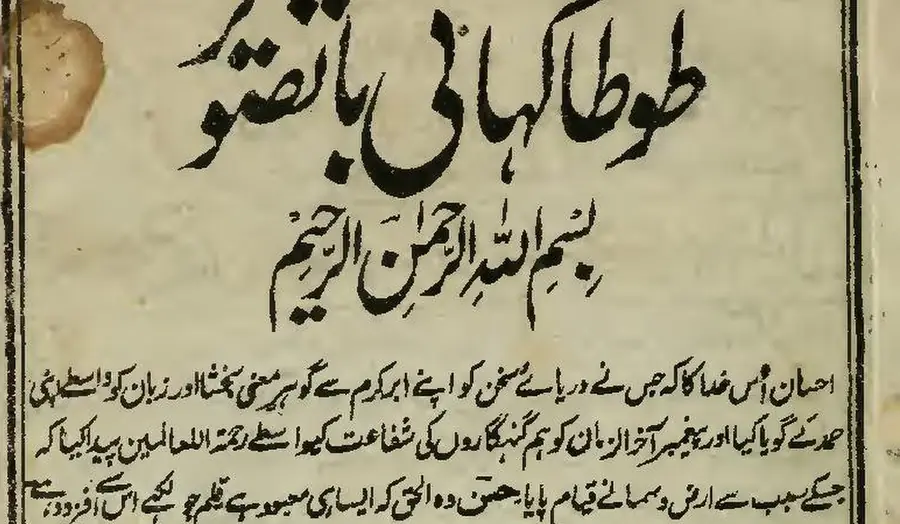
First body line, as printed (Wikisource transcription)
احسان اُس خدا کا کہ جس نے دریائے سخن کو اپنے ابر کرم سے گو ہرِ معنی بخشا اور زبان کو واسطے اپنی
- 9.1% of characters wrong
FastOCR
published by us
احسان اُس خدا کا کہ جس نے دریائے سخن کو اپنے ابر کرم سے گو ہر معنی بخشا اور زبان کو واسطے اپنی
- 9.2% of characters wrong
imagetotext.info
free web tool
احسان اُس خدا کا کہ جس نے دریائے سخن کو اپنے ابر کرم سے گو ہر معنی بخشا اور زبان کو واسطے اپنی
- 30.4% of characters wrong
OCR.space
default Engine 2
احسان أس مداكاكيج سنءريات سخن كواب ابركرم ← كوبر معى تختا اورزيان كوداسطيى
- 55.3% of characters wrong
Tesseract 5.5.4
the engine NewOCR says it uses
ا احمان اس دا اجس ےه در را سخ نکو ان ارک سےکوس ین یناد زا نک ری
- 99.6% of characters wrong
OnlineOCR.net
no Urdu option
tA)K11 tAirk.,....11.30,t4 ikitt r CIO 4 %;114iiii
What OCR scanning software does
OCR scanning software, also sold as OCR scanner software, document OCR software or document recognition software, turns the picture of a page into text you can search, copy and edit. A scanner or phone camera only takes the picture. The OCR step reads the letters, and the better tools also write a searchable PDF: the original page image stays on top and an invisible text layer sits behind it, so the file looks unchanged but search and copy work.
The tools on this page fall into four groups. Paid desktop suites (ABBYY FineReader PDF, Readiris, PDFelement, Nitro and Adobe Acrobat) bundle OCR with PDF editing. Built-in features (Google Drive, Microsoft OneNote, Apple Live Text) cost nothing extra but return plain text. Open-source Tesseract is a library for developers. Web tools such as FastOCR and PDF24 need no install. Looking only for no-cost options? Our best free OCR tools guide covers the free side in depth.
Which OCR software reads scans correctly? Our six-script test
A feature list does not tell you whether the words come out right, so we measured. Public-domain scanned book pages, one per script (Arabic, Urdu, Bengali, Tamil, Chinese and English), went through every tool we could run without buying a licence. Each output was scored against the page's Wikisource transcription as the share of characters wrong, so lower is better.
Of the six scripts shown (Arabic, Urdu, Bengali, Tamil, Chinese and English), FastOCR had the lowest or tied-lowest error rate on 6 (gaps under 3 points count as ties). imagetotext.info and OCR.space were close on several pages. The gap that matters is with the free engines most sites use: on Urdu, Tesseract got 55.3% and PDF24 69.0% of characters wrong, against FastOCR's 9.1%. On English the spread is small: Tesseract 8.5%, FastOCR 3.3%. Lower is better.
Gaps under three points are ties. imagetotext.info scored 2.9% on Arabic and 9.2% on Urdu, level with FastOCR. Lower is better in each case.
We did not run ABBYY FineReader PDF, Adobe Acrobat, Readiris, PDFelement, Nitro, Google Drive, OneNote or Live Text. The paid suites need a licence or trial account, so they are compared here on their own published facts. Dates and caveats are under how we tested.
OCR software for Windows and Mac
Most paid OCR software is a desktop suite. ABBYY FineReader PDF and Readiris run on Windows and Mac; PDFelement and Nitro add OCR to a full PDF editor; Acrobat does the same for Adobe customers. They suit offices that scan every day and want one licensed tool on each PC.
FastOCR's desktop apps for Mac and Windows are free and in public beta. They make searchable PDFs, text, Word and Markdown files offline, with no account, and your scans never leave the computer. They read with the recognition built into each system, Apple Vision on the Mac and Windows OCR on Windows, so the website's test numbers above do not apply to them. Requirements: macOS 13 or later for the Mac app and Windows 10 version 22H2 or Windows 11, 64-bit (x64) for the Windows app. Both builds are unsigned, so macOS and Windows SmartScreen warn you the first time you open them.
Two more no-cost options run locally: Tesseract, from the command line, and the desktop app PDF24 offers next to its web tool.
OCR scanner apps for phones
A phone scanner app captures the page and runs OCR in one step. Adobe Scan makes searchable PDFs; its settings page lists text recognition for Chinese, Japanese and Korean, its Android release notes add Hindi, and its troubleshooting page says OCR needs a network connection and an Adobe cloud storage connection and produces no output when the chosen language does not match the document. Source: Adobe Scan troubleshooting, checked 4 November 2026. Compare: FastOCR vs Adobe Scan.
CamScanner's FAQ says basic accounts can run recognition up to 10 times, Premium allows 1,000 a month, and a watermark and QR code are added to exported PDFs and images until you upgrade. Source: CamScanner FAQ, checked 4 November 2026. Compare: FastOCR vs CamScanner.
FastOCR needs no app: open image to text in a phone browser, take or choose a photo, and get text and a searchable PDF back. Apple's Live Text, covered in the tool list, copies a few lines straight from the camera.
1. FastOCR (our tool)
- Best for
- Scans and photos in many scripts when you want a searchable PDF, Word and Markdown with nothing to install, or an offline app or API.
- Watch out for
- PDFs need a free account and batch upload is on paid plans. Handwriting is untested, and every OCR result needs a proofread.
FastOCR reads scanned pages, photos and screenshots in 100+ languages and works out the language itself, even when one page mixes scripts. Every image comes back as raw text and a one-page searchable PDF, with Word and Markdown downloads, no sign-up and no watermark. To try it, use free OCR online on the home page.
A scanned PDF comes back as a searchable PDF that looks like the original, and copied text keeps its reading order, right-to-left included. PDFs need a free account; paid plans add batch upload. Finished images can be translated or cleaned up with AI Polish.
More from FastOCR:
- Mac and Windows apps that work offline, free during the public beta.
- A REST API, Python SDK and MCP server, plus LangChain and LlamaIndex loaders.
- A Chrome extension that copies text from anything on screen.
- Free PDF tools that run in the browser and keep files on your device: merge, compress, split, sign and more.
- Bank statements to Excel, CSV and QuickBooks.
In our test: 3.3% of characters wrong on the English page, 2.6% on Arabic and 9.1% on Urdu, lower is better.
Searchable PDF that copies in reading order
احسان اُس خدا کا کہ جس نے دریائے سخن کو اپنے ابر کرم سے گو ہر معنی بخشا اور زبان کو واسطے اپنی
Select and paste: Urdu, Arabic and Hebrew come out right to left, and two-column pages come out column by column.
Word file with paragraphs and tables
| Item | Qty | Total |
| Paper | 4 | 18.00 |
| Toner | 1 | 64.50 |
Prose reflows into editable paragraphs; ruled tables come back as real Word tables. PDF to Word
Bank statement to Excel, CSV or QuickBooks
| Date | Description | Amount | Balance |
| 09/01 | Rent payment | -1,450.00 | 968.65 |
| 09/02 | Payroll deposit | 2,386.40 | 3,355.05 |
| 09/04 | Grocery store | -84.17 | 3,270.88 |
One row per transaction, for US and UK statements in English (example rows invented). Bank statement converter
2. ABBYY FineReader PDF
- Best for
- Offices with heavy desktop document work that need a long list of recognition languages.
- Watch out for
- Its recognition list does not include Urdu, Persian, Hindi, Bengali or Tamil, and the browser version, FineReader Online, has been discontinued.
ABBYY FineReader PDF is paid desktop OCR software for Windows and Mac. ABBYY's specifications page says it supports 198 recognition languages, including Arabic, Hebrew, Chinese, Japanese, Korean and Thai. Its feature list covers digitizing to searchable PDFs and converting several documents into editable formats at once with the same settings.
It is sold as a subscription: Standard for Windows is US$99 a year or US$16 a month, and FineReader PDF for Mac is US$69 a year. The pricing page lists a 7-day trial and says plans renew automatically. ABBYY's end-of-life page says FineReader Online is no longer available.
In our test: not run; it needs a trial account. Compared here on ABBYY's published facts.
Source: ABBYY specifications, checked 4 November 2026. Compare: FastOCR vs ABBYY FineReader.
3. Adobe Acrobat
- Best for
- PDFs in Latin script, Chinese or Japanese, in an office that already pays for Acrobat.
- Watch out for
- The free online tool takes PDFs only and asks you to sign in to download. Arabic, Urdu and Hindi are not stated on the Adobe pages we checked.
Adobe's free online OCR makes a scanned PDF searchable. You can start without an account, but you sign in to download the result, and Adobe says the file is deleted unless you sign in to save it. Text recognition on PNG, JPG and TIFF images is described under the 7-day Acrobat Pro trial rather than the free tool.
Paid plans start with Acrobat Standard at US$14.99 a month on an annual plan billed monthly. The online page names English, German, Spanish, French and Portuguese, Adobe's OCR language list adds Chinese and Japanese, and the page warns that handwritten text can reduce accuracy.
In our test: not run.
Source: Adobe online OCR, checked 4 November 2026. Compare: FastOCR vs Adobe Acrobat.
4. Readiris PDF
- Best for
- A one-time desktop licence instead of a subscription.
- Watch out for
- Its language list does not include Urdu, Hindi, Bengali or Tamil, and Farsi is marked as Windows only.
Readiris PDF from IRIS is desktop OCR software for Windows and Mac. Its page says it converts paper to searchable PDFs in 138 languages, batch converts multiple files simultaneously and turns PDFs into Word or Excel. The OCR list names Arabic, Hebrew, Chinese, Japanese, Korean and Thai, with Farsi for Windows.
The page showed Readiris PDF 27 Essential at US$79 for a perpetual licence, against a crossed-out US$129, which may be a promotion. A free trial download is offered.
In our test: not run.
Source: Readiris PDF, checked 4 November 2026.
5. Wondershare PDFelement
- Best for
- Editing PDFs and running OCR in the same desktop app.
- Watch out for
- Both the unregistered and the 14-day trial watermark saved PDFs, and the published OCR list names 29 languages for Windows.
PDFelement is a PDF editor for desktop and mobile with OCR inside. Its tech spec offers two OCR modes, 'Searchable Text Image' and 'Editable Text', and conversion to Word, Excel and text; its buy page lists batch processing.
The published Windows OCR list names Arabic, Chinese, Japanese, Korean and Thai, and Wondershare says the full list is shown in the app. You can try it without registering, but saved PDFs carry a watermark until you pay.
In our test: not run.
Source: PDFelement tech spec, checked 4 November 2026. Compare: FastOCR vs PDFelement.
6. Nitro PDF
- Best for
- Teams that want batch OCR inside a paid PDF editor.
- Watch out for
- There is no ongoing free plan, only a 14-day trial, and the pages we read do not list OCR languages.
Nitro PDF is a PDF editor for desktop, web and mobile. Its pricing page lists batch OCR that converts scanned documents to searchable, editable PDFs, and conversion to Word, Excel and PowerPoint. Nitro PDF Standard is listed at US$15 per user a month, billed annually, and the trial is advertised with no watermarks.
In our test: not run.
Source: Nitro pricing, checked 4 November 2026. Compare: FastOCR vs Nitro PDF.
7. Google Drive (Google Docs)
- Best for
- Small files you will edit in Google Docs.
- Watch out for
- Files should be 2 MB or smaller, you get a Doc rather than a searchable PDF, and Google says tables and columns are not likely to be detected.
Put a PDF or photo in Google Drive, open it with Google Docs, and the text appears in a new Doc. Google's help page says Drive detects the language, wants text at least 10 pixels high and pages the right way up, and lists Arabic, Urdu, Persian, Hindi, Bengali, Tamil and Chinese among its languages.
In our test: not run.
Source: Google Drive Help, checked 4 November 2026. Compare: FastOCR vs Google Drive OCR.
8. Microsoft OneNote
- Best for
- Text from a picture or printout that already sits in your notes.
- Watch out for
- Microsoft's help page says some results can take 24 to 48 hours, and it lists no languages or file limits.
In OneNote, right-click a picture and choose Copy Text from Picture. For a file printout you can copy the text of one page or of every page.
Microsoft Lens, the phone scanner often paired with OneNote, has been retired. Microsoft's page dates the retirement from 9 January 2026 and points to the scanner in the OneDrive app instead.
In our test: not run.
Source: OneNote help, checked 4 November 2026. See also Microsoft Lens retirement. Compare: FastOCR vs OneNote OCR.
9. Apple Live Text
- Best for
- Copying a few lines with an iPhone camera.
- Watch out for
- Apple's feature list does not include Arabic, Urdu, Persian, Hindi, Bengali or Tamil for Live Text, and you get text, not a document.
Live Text is part of iOS on iPhone XS, XR and later with iOS 15 or later. Point the camera at a page or open a photo, and you can copy, share, look up or translate the text. Apple's feature list names Chinese, Japanese, Korean and Thai among its languages, and Apple notes it isn't available in all regions or languages.
In our test: not run.
Source: Apple feature availability, checked 4 November 2026. Compare: FastOCR vs Apple Live Text.
10. Tesseract (open source)
- Best for
- Developers who want a free OCR library to build into their own code.
- Watch out for
- It has no built-in window, and it did poorly on our Urdu and Chinese pages even with the right language pack.
Tesseract is open-source OCR under the Apache License 2.0. Its README says it recognizes more than 100 languages and writes plain text, hOCR, PDF, an invisible-text-only PDF, TSV and ALTO. Its documentation says there is no built-in GUI, and its FAQ says it is designed for printed text, not handwriting.
In our test: Tesseract 5.5.4 got 8.5% of the English page's characters wrong and 8.5% of the Tamil page, but 55.3% of Urdu and 71.9% of Chinese. Lower is better.
Source: Tesseract on GitHub, checked 4 November 2026. Compare: FastOCR vs Tesseract.
11. PDF24
- Best for
- A scanned PDF made searchable with no account, on the web or in its desktop app.
- Watch out for
- You pick the language by hand, and its right-to-left results were weak in our test.
PDF24 is a free, ad-funded tool set with a web OCR page and a desktop app. Its page says no registration is required, files leave its servers after one hour, and you get a searchable PDF or PDF/A back. Its language menu includes Arabic, Urdu, Persian, Hindi, Bengali and Tamil.
In our test: PDF24 got 10.1% of the English page wrong and 3.2% of Chinese, but 35.5% of Arabic and 69.0% of Urdu. Lower is better.
Source: PDF24 OCR, checked 4 November 2026. Compare: FastOCR vs PDF24.
OCR for legal and financial firms: batches, accuracy and archives
Law and finance teams need three things from OCR: many files processed at once, PDFs that can be searched and archived, and text they can trust. On batches, ABBYY FineReader PDF and Readiris both advertise converting many files at once on the desktop, Nitro lists batch OCR, and FastOCR batches PDFs on paid plans in the browser or through its API. On accuracy, we tested book pages, not contracts: FastOCR got 3.3% of the characters on our English page wrong and Tesseract 8.5%, lower is better. We did not time any tool, and we found no records-manager survey we could verify, so we name no speed or survey winner.
For archives, a searchable PDF keeps the scanned image and adds hidden text, so the file still matches the paper. PDF24 also offers PDF/A output, which some archives require. Contracts carry stamps, signatures and small print, so proofread names, dates and amounts, and run ten of your own files through two tools before you commit.
OCR for scanned medical records
Searchable medical records need a tool whose output is a searchable PDF, not just copied text. Adobe Acrobat, ABBYY FineReader PDF, Readiris, PDFelement, Nitro, PDF24, Tesseract and FastOCR all list searchable PDF output; Google Drive gives a Google Doc, and OneNote and Live Text give copied text. On cost, Tesseract and PDF24 are free, FastOCR's PDFs need a free account, and the suites are paid. We measured printed book pages, not charts, forms or prescriptions, and we have not measured handwriting, so this page names no winner for doctors' notes. FastOCR makes no HIPAA claim. Check your own compliance rules before a patient record leaves your building. Offline choices are the desktop suites, Tesseract, and FastOCR's Mac and Windows apps, which never upload a file.
Old scanned PDFs and handwritten notes
Old printed pages read well when the scan is clean. Our test pages were public-domain book scans, among them an Arabic book printed in 1951 and an Urdu story first written in 1801. FastOCR got 2.6% of the Arabic page and 9.1% of the Urdu page wrong, lower is better. Library scans are cleaner than a stained, torn or faded file, so expect more errors on damaged paper with every tool.
Handwriting is a different problem, and we have not measured it. Tesseract's FAQ says it is designed for printed text, and Adobe's OCR page warns that handwriting can reduce accuracy. Test three or four real handwritten pages before you trust any tool with them.
FastOCR is an OCR tool, not a document management system. It turns old scans into searchable PDF, Word or Markdown files that you then file in whatever system you use.
Batch processing scanned documents
How each tool describes batch work on its own pages:
- ABBYY FineReader PDF: converts multiple documents into editable formats at once, with the same settings.
- Readiris: batch converts several files at the same time.
- Nitro and PDFelement: both list batch OCR on their buy or pricing pages.
- PDF24: can join several files into one output.
- FastOCR: batch upload of PDFs on paid plans, and the API and Python SDK for looping over a folder.
- Tesseract: no batch window; you script it.
- Adobe's free online tool, Google Drive and OneNote do not mention batches on the pages we checked.
Plan the page count before a big job. See pricing for FastOCR plans and page packs.
Multi-language documents
For companies that scan in many languages, two things decide the choice: whether your scripts are listed, and whether the tool works out the language itself. ABBYY FineReader PDF lists 198 recognition languages and Readiris 138, but neither list includes Urdu, Hindi, Bengali or Tamil. Tesseract has models for more than 100 languages, and you pick one per run. Google Drive lists Urdu, Hindi and Bengali and detects the language itself. FastOCR detects 100+ languages automatically, including pages that mix scripts, so nobody has to choose a language per file. In our test that gave 7.4% of characters wrong on Bengali and 2.2% on Tamil, where Tesseract got 31.7% and 8.5%. Lower is better. See all supported languages.
OCR libraries and APIs for developers
If you are writing code, the choice is between a library you run and a service you call. Tesseract is the open-source library: free under the Apache License, more than 100 languages, and you manage installs, language packs and image cleanup yourself.
FastOCR is the service option. Its REST API returns text or a searchable PDF, and the Python SDK, an MCP server for AI agents, and LangChain and LlamaIndex loaders wrap it. The API's free monthly pages are shared with PDF use on the website. In our test the gap mattered most on Urdu and Chinese, where Tesseract got most characters wrong.
Tips for better OCR on scanned documents
- Scan at 300 DPI, or 600 DPI for small print and footnotes.
- Keep the page flat and straight, with dark text on a light background.
- Send many-page documents as one PDF and single pages as JPG or PNG.
- Find your script on the tool's language list before you upload.
- After OCR, compare names, dates and figures with the paper.
- For right-to-left text, paste a line into a text editor and check that the first word sits at the right.
When another tool is the better choice
- You need more languages than FastOCR's 100+, or a licensed desktop suite: ABBYY FineReader PDF lists 198 and Readiris 138.
- Your team already lives in Acrobat, PDFelement or Nitro and mostly scans Latin-script, Chinese or Japanese pages.
- You want a one-time licence: Readiris sells a perpetual one.
- You want an engine to embed and host yourself: Tesseract is free and open source.
FAQ
What is the best OCR software?
It depends on the job. For scans in many scripts with nothing to install, FastOCR (our tool) returns a searchable PDF, Word and Markdown. For heavy desktop work and a long language list, ABBYY FineReader PDF. For offices on Acrobat, Adobe. For developers, Tesseract or the FastOCR API.
Which OCR software is most accurate on scanned documents?
It varies by script and by page. Of the six scripts shown (Arabic, Urdu, Bengali, Tamil, Chinese and English), FastOCR had the lowest or tied-lowest error rate on 6 (gaps under 3 points count as ties). We did not run ABBYY, Adobe or Readiris.
Which OCR software suits legal firms that need batch processing?
ABBYY FineReader PDF and Readiris advertise desktop batch conversion, and Nitro lists batch OCR. FastOCR batches PDFs on paid plans and returns searchable PDFs that copy in reading order. We did not time any tool or test legal files, so run ten of your own documents through two tools first.
Which OCR tools make scanned medical records searchable?
Adobe Acrobat, ABBYY FineReader PDF, Readiris, PDFelement, Nitro, PDF24, Tesseract and FastOCR all list searchable PDF output. Google Drive returns a Google Doc instead. FastOCR makes no HIPAA claim, so check your compliance rules before uploading patient records anywhere.
Can OCR software read old scanned PDFs and handwritten notes?
Old printed scans, yes, when the scan is clean: FastOCR got 2.6% of the characters on a 1951 Arabic book page wrong, lower is better. Handwriting is harder. We have not measured it, and Tesseract says it is designed for printed text.
Which OCR tools handle poor-quality scans?
We cannot rank them, because our test pages were clean library scans. Every tool makes more mistakes on faded, skewed or stained pages. Rescan at 300 DPI or higher if you can, straighten the page, and proofread the output against the paper.
Is there OCR software that works offline on Windows or Mac?
Yes. ABBYY FineReader PDF and Readiris are paid desktop suites for both systems. FastOCR's Mac and Windows apps are free public betas that make searchable PDFs, text, Word and Markdown without uploading anything. Tesseract runs offline too, from the command line.
What is the best OCR library or API for developers?
Tesseract is the main open-source library: free, more than 100 languages, but you host and tune it. FastOCR offers a REST API, a Python SDK, an MCP server for AI agents, and LangChain and LlamaIndex loaders, with automatic language detection.
Method
Vendor facts come from each tool's own pages, read on 4 November 2026; where a page says nothing, the table shows Not stated rather than No.
- When: Tesseract, PDF24, OCR.space and imagetotext.info ran on 31 October 2026. FastOCR's output came from its production API on 25 October 2026. We plan to re-run before January 2027.
- What: scanned book pages from Wikimedia Commons, all public domain or CC0, one per script, scored against Wikisource transcriptions.
- Score: share of characters wrong after removing spaces, punctuation and Arabic diacritics; lower is better. The Wikisource text itself differs from a proofread key by 1% to 6%, so treat gaps under 3 points as a tie.
- Image size: FastOCR read 500-pixel-wide versions of the Arabic, Urdu and English pages; the others read 1,280-pixel versions.
- Setup: Tesseract 5.5.4 ran locally with the matching language pack; PDF24 ran on its website with the language picked by hand; OCR.space ran on its public demo key, and empty Engine 3 results are left out because they may be rate limiting.
- Not run: ABBYY FineReader PDF, Adobe Acrobat, Readiris, PDFelement, Nitro, Google Drive, OneNote, Live Text, Adobe Scan and CamScanner. Handwriting, legal and medical files were not part of the test.
- Credits: scans from Wikimedia Commons, text from Wikisource.
Change log
- 22 January 2025: First published.
- 1 November 2026: Added the accuracy test and answers for legal, medical and old scans.
- 4 November 2026: Widened to free and paid OCR software: added Readiris, PDFelement, Nitro, OneNote and Apple Live Text, re-checked every vendor fact, and dropped OmniPage and two web-only tools now covered in the free guide.