Bengali OCR — Image to Text & PDF
ছবি এবং স্ক্যান করা ডকুমেন্ট থেকে বাংলা টেক্সট এক্সট্রাক্ট করুন
- Bengali-Assamese script
- Conjunct characters (Yuktakshar)
- Vowel signs (Karas)
Free image OCR. No account needed. PDFs use pages.
Open OCR for all languagesAnandamath, 1925
Real scan. Unedited OCR.
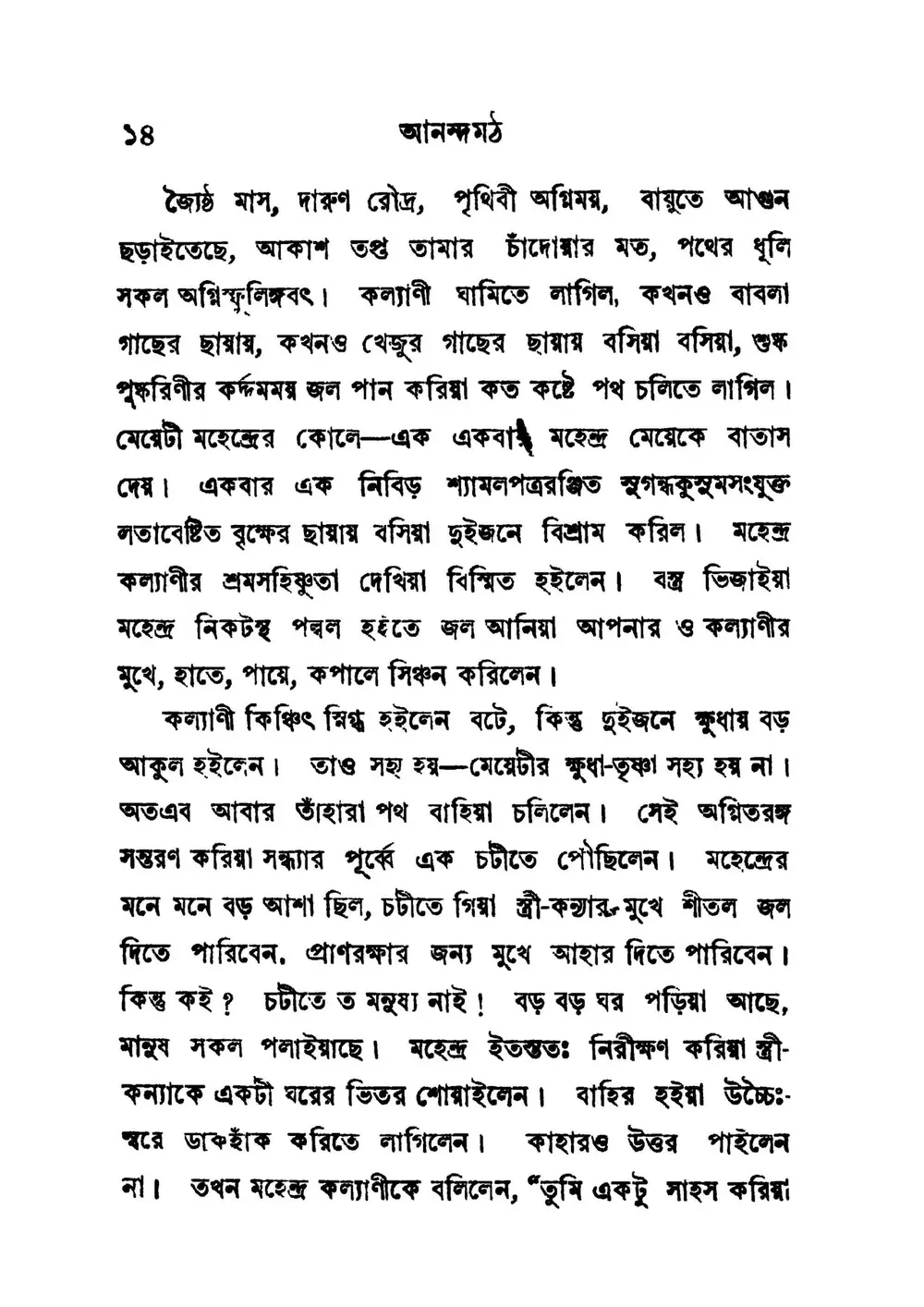
১৪ আনন্দমঠ
জ্যৈষ্ঠ মাস, দারুণ রৌদ্র, পৃথিবী অগ্নিময়, বায়ুতে আগুন
ছড়াইতেছে, আকাশ তপ্ত তামার চাঁদোয়ার মত, পথের ধূলি
সকল অগ্নিস্ফুলিঙ্গবৎ। কল্যাণী ঘামিতে লাগিল, কখনও বাবলা
গাছের ছায়ায়, কখনও খেজুর গাছের ছায়ায় বসিয়া বসিয়া, শুষ্ক
পুষ্করিণীর কদমময় জল পান করিয়া কত কষ্টে পথ চলিতে লাগিল।
মেয়েটী মহেন্দ্রের কোলে— এক একবার মহেন্দ্র মেয়েকে বাতাস
দেয়। একবার এক নিবিড় শ্যামলপত্ররঞ্জিত সুগন্ধকুসুমসংযুক্ত
লতাবেষ্টিত বৃক্ষের ছায়ায় বসিয়া দুইজনে বিশ্রাম করিল। মহেন্দ্র
কল্যাণীর শ্রমসহিষ্ণুতা দেখিয়া বিস্মিত হইলেন। বস্ত্ৰ ভিজাইয়া
মহেন্দ্ৰ নিকটস্থ পদ্মল হইতে জল আনিয়া আপনার ও কল্যাণীর
মুখে, হাতে, পায়ে, কপালে সিঞ্চন করিলেন।
কল্যাণী কিঞ্চিৎ স্নিগ্ধ হইলেন বটে, কিন্তু দুইজনে ক্ষুধায় বড়
আকুল হইলেন। তাও সহ হয়— মেয়েটার ক্ষুধা- তৃষ্ণা সহ্য হয় না।
অতএব আবার তাঁহারা পথ বাহিয়া চলিলেন। সেই অগ্নিতরঙ্গ
সস্তরণ করিয়া সন্ধ্যার পূর্ব্বে এক চটীতে পৌছিলেন। মহেন্দ্রের
মনে মনে বড় আশা ছিল, চটীতে গিয়া স্ত্রী- কন্যার মুখে শীতল জল
দিতে পারিবেন, প্রাণরক্ষার জন্য মুখে আহার দিতে পারিবেন।
কিন্তু কই? চটীতে ত মনুষ্য নাই! বড় বড় ঘর পড়িয়া আছে,
মানুষ সকল পলাইয়াছে। মহেন্দ্র ইতস্ততঃ নিরীক্ষণ করিয়া স্ত্রী-
কন্যাকে একটা ঘরের ভিতর শোয়াইলেন। বাহির হইয়া উচ্চৈঃ-
স্বরে ডাক হাঁক করিতে লাগিলেন। কাহারও উত্তর পাইলেন
না। তখন মহেন্দ্ৰ কল্যাণীকে বলিলেন,“ তুমি একটু সাহস করিয়া
Original text order preserved
Bengali OCR converts images, scans and PDFs containing Bengali (বাংলা) text into editable, searchable digital text. FastOCR reads Bengali online: upload an image with no account, or a PDF with a free account, then copy the text or download a searchable PDF. Accuracy depends on scan quality, so check the result against your original.
Try it with your Bengali document
Drop your file here
PDF, PNG, JPG, WebP, BMP, HEIC
PDF up to 1 GB · images up to 20 MB
Tips for a clear photo
- Lay the page flat.
- Use even light, with no shadows.
- Turn off the flash to avoid glare.
- Fill the frame with the page.
What is Bengali OCR & Developer API?
Developer API docs →Bengali OCR is the automated process of converting scanned multi-page PDFs up to 1GB and documents into editable, searchable Bengali text while preserving accents, complex ligatures, and native character shapes. FastOCR reads printed text in this script and generates full-text searchable PDFs with selectable text overlays. For engineering teams building RAG pipelines, vector search databases, or automated document ingestion, FastOCR also provides a Bengali OCR REST API at api.fastocr.org with 20 free pages a month for every signed-in account. The API accepts PDF files up to 1 GiB, and PNG, JPG, JPEG, GIF, WebP and BMP images up to 20 MiB. An image counts as one page.
Bengali-Assamese script
Full support for Bengali and Assamese characters and alphabets.
Conjunct characters (Yuktakshar)
Recognizes complex merged letters and conjunct consonants.
Vowel signs (Karas)
Correctly interprets diacritical vowel signs attached around consonants.
Mixed Bengali & English
Handles bilingual documents containing both scripts.
Searchable PDF output
Creates PDFs with invisible text layer for full-text search.
Translate after extraction
Extract Bengali text then translate to any language.
Why Bengali OCR Is Challenging
- Recognizing complex conjunct consonants (যুক্তাক্ষর) where letters merge and change shapes
- Distinguishing vowel symbols (কার) that appear before, after, above, or below the consonant
- Handling the shirorekha (connecting headline) that runs along the top of Bengali words
- Processing degraded scans or low-contrast photocopies of Bengali publications
- Correctly segmenting words in dense print where characters are close or touching
How to Extract Bengali Text from a PDF & Images
- Go to fastocr.org
- Upload your Bengali image or PDF. Language is detected automatically.
- Wait for processing — images take seconds, PDFs show a progress bar.
- Download results: searchable PDF, raw text file, or copy text directly.
Tips for Better Bengali OCR Accuracy
- Scan at 300 DPI or higher to capture the intricate details of Bengali conjuncts and vowel signs
- Ensure the connecting headline (shirorekha) is clear and not broken by noise or dust
- Verify complex character combinations like ক্ষ, জ্ঞ, ঞ্চ, which are commonly misread
- Use high-contrast inputs to prevent small diacritical dots (like in ড়, ঢ়) from getting lost
Common Use Cases for Bengali OCR
- Digitizing Bengali legal papers, deeds, and land records (Parcha)
- Extracting text from Bangladeshi and Indian government documents, IDs, and certificates
- Converting scanned Bengali books, poetry, and academic publications
- Processing Bengali business invoices, bills, and trade documents
- Archiving historical Bengali literature and newspaper collections
FastOCR vs Standard OCR Apps for Bengali
| Capability | FastOCR Dedicated Cloud AI | Standard Online OCR Tools |
|---|---|---|
| Bengali Script Recognition | ✅ Full native cloud recognition for Bengali (complex alphabets and diacritics) | Limited character sets or unhandled accents |
| Multi-Column & Table Layouts | ✅ Preserves proper paragraph and table alignment | Merges unrelated columns together |
| Searchable PDF Output | ✅ Dual-layer searchable PDF with coordinate-aligned text overlay | Plain unformatted text dump only or unsupported |
| Instant Web Access | ✅ Zero software installation (runs in mobile & desktop browser) | Requires local CLI libraries or complex desktop setup |
Frequently Asked Questions
How accurate is Bengali OCR on printed text?
FastOCR reads printed Bengali text. Complex conjuncts and faded print may slightly lower the accuracy rate.
Can Bengali OCR recognize handwriting?
Partially. Clean handwritten Bengali (especially list forms or clear print-like styles) is recognized less reliably than print.
Is Bengali OCR free?
Yes. Image OCR is free: try it without an account, and sign in for unlimited free image OCR. PDF processing requires a free account — see fastocr.org/pricing for plan details.
What file formats does Bengali OCR support?
FastOCR supports JPG, PNG, GIF, WebP, BMP images and PDF documents for Bengali text extraction. The max file size is 20MB for images and 1GB for PDFs.
Dedicated Bengali Tools
PDF to Text
Convert and extract Bengali documents.
Image to Text
Convert and extract Bengali documents.
Handwriting OCR
Convert and extract Bengali documents.
Searchable PDF
Convert and extract Bengali documents.
Bengali to English Translation
Convert and extract Bengali documents.
English to Bengali Translation
Convert and extract Bengali documents.
All supported languages
Convert and extract Bengali documents.
Explore Specialized OCR Workflows
FastOCR provides dedicated AI text recognition engines optimized for complex document types and formats:
Free for images. No registration required.
Related Articles & Resources
Image to Text
Convert any image to editable text instantly
Bengali OCR Guide
Read the complete guide to Bengali OCR and text extraction
Bengali Handwriting OCR
Digitize handwritten Bengali and cursive manuscripts
Hindi OCR
OCR for Hindi — shares Devanagari roots with Bengali script concepts
PDF to Text
Extract text from scanned and native PDFs
Best Free OCR Tools
Compare the top free OCR tools available in 2026
What is OCR?
Learn how optical character recognition technology works.
How Accurate Is OCR?
Discover the accuracy limits of modern OCR technology.
Free Bengali OCR
Upload & Extract TextLast updated: July 24, 2026