Smallpdf OCR tool review: is it good for scanning, and what to use instead
Short answer
Is Smallpdf good for OCR scanning? For a small PDF OCR job, yes: it makes a scanned PDF searchable with no sign-up. But the free plan has an unpublished daily download limit; our second file was refused with a 6.5-hour wait. On our one scored page, Arabic, its text came back as Latin letters. FastOCR (we make it) returns text, a searchable PDF, Word and Markdown, free for images.
By the FastOCR team · Updated 4 November 2026 · Accuracy test run 31 October 2026
We make FastOCR. Accuracy figures come from our own test of each tool we scored, ours included, on the same scans; other facts link to each tool's own pages. How we tested
Try it here
Drop your file here
PDF, PNG, JPG, WebP, BMP, HEIC
PDF up to 1 GB · images up to 20 MB
Tips for a clear photo
- Lay the page flat.
- Use even light, with no shadows.
- Turn off the flash to avoid glare.
- Fill the frame with the page.
Verdict
Pick FastOCR if
- You want to read and copy the text on screen first, then download a searchable PDF, Word or Markdown from the same upload.
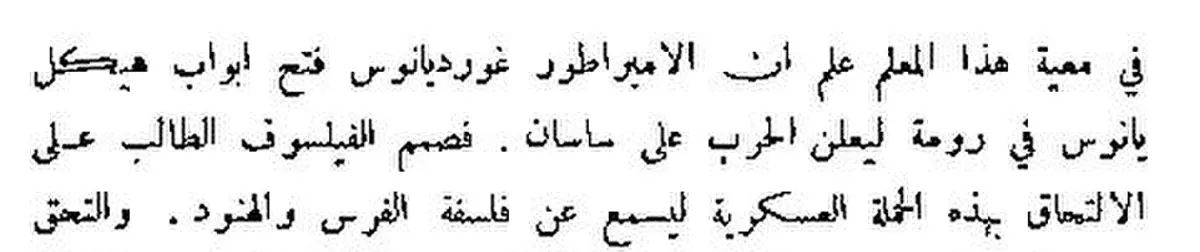
- Your scan is Arabic or another right-to-left script. FastOCR got 2.6% of our Arabic page wrong; Smallpdf got 99.1% (lower is better).
- You have several images today: with a free account, image OCR has no daily cap.
- The file must not leave your computer: the free Mac and Windows apps (beta) work offline.
Pick Smallpdf if
- You already merge, compress and convert files in Smallpdf and want OCR in that same account.
- You plan to edit the words inside the PDF afterwards; the Pro plan lists Edit Text next to OCR.
- You only need one or two PDFs made searchable today, in a language you have checked it on.
FastOCR and Smallpdf side by side
| Factor | FastOCR | Smallpdf |
|---|---|---|
| Sign-up for free OCR | FastOCRImages: none. PDFs: a free account. | SmallpdfNot needed. The OCR page says "no signups".Source |
| Free limit, as advertised | FastOCRA small daily image cap until you sign in; a free account removes it. See pricing. | SmallpdfA "daily download limit" on the free plan, with no number given.Source |
| A second free file the same day | FastOCRImages: works (visitors have a small daily cap; signed in, none). PDFs: works with a free account, within the free monthly pages. | SmallpdfRefused with "You’re out of free downloads" and a wait of about 6.5 hours (31 October 2026).Our test |
| Files it accepts | FastOCRPhotos, screenshots, scanned images and PDFs. | SmallpdfPDF, Word, PowerPoint, Excel, JPG, BMP, GIF, TIFF and more.Source |
| What you get back | FastOCRRaw text on screen, a searchable PDF, Word (.docx) and Markdown. | SmallpdfA searchable PDF. Word is a second step through its separate PDF to Word converter.Source |
| Languages | FastOCR100+ languages, detected automatically, including mixed pages. | Smallpdf"Many different languages"; the OCR page does not list them.Source |
| Arabic page, share of characters wrong (lower is better) | FastOCR2.6% | Smallpdf99.1%: the text layer was Latin-letter garbage.Our test |
| Watermark on free output | FastOCRNone on text, Word, Markdown or the searchable PDF. | SmallpdfNot statedSource |
| What happens to uploads | FastOCRProcessed on our servers; see the privacy policy. | SmallpdfDeleted after one hour unless you save them to a Smallpdf account.Source |
| Paid plan | FastOCRMonthly plans or one-time page packs. | SmallpdfSmallpdf Pro, with a 7-day free trial. The price is not stated on the pages we checked.Source |
Why FastOCR
Scanned PDFs
Scanned PDF in, searchable PDF out; text copies in the right order, including right-to-left.
See Scanned PDFsPhotos and screenshots
Every image upload gets raw text and a single-page searchable PDF, plus Word and Markdown.
See Photos and screenshotsLanguages
100+ languages, detected automatically, including mixed pages.
Share of characters wrong on our evidence scans (lower is better): Arabic 2.6%, Urdu 9.1%, Bengali 7.4%, Tamil 2.2%, Chinese 1.0%.
See LanguagesFree use
Images: free, no sign-up, no watermark. PDFs: free account.
See Free useOffline desktop apps
Free offline Mac and Windows apps (public beta): searchable PDF, text, Word and Markdown, nothing leaves your computer.
See Offline desktop apps
Proof
Smallpdf allowed one free download, so it has one score: 99.1% of the Arabic page wrong, against FastOCR's 2.6% (lower is better). PDF24, scored on the six pages shown, was higher than FastOCR on every one.
FastOCR
في معية هذا المعلم علم ان الامبراطور غورديانوس فتح ابواب هيكل
يانوس في رومة ليعلن الحرب على ساسان . فصمم الفيلسوف الطالب على
الالتحاق بهذه الحملة العسكرية ليسمع عن فلسفة الفرس والهنود. والتحق
Smallpdf
u
'H as 'He 'in 'wtf 'woo
\ 'a.:;ffu1;{ art; Fu he u.:a2sv5; aw up »'ir/d0s'0!.1r,'d Pam 'NT "r 'Zaqrg% of characters wrong by script, lower is better
- FastOCR
- PDF24 OCR
- Smallpdf (Arabic page only)
- OCR.space Engine 3
- imagetotext.info
| Script | Character error rate by tool |
|---|---|
| Chinese | FastOCR 1.0% PDF24 3.2% Smallpdf no score OCR.space E3 no score |
| Tamil | FastOCR 2.2% PDF24 9.2% Smallpdf no score OCR.space E3 no score |
| Arabic | FastOCR 2.6% PDF24 35.5% Smallpdf 99.1% OCR.space E3 2.9% imagetotext.info 2.9% |
| English | FastOCR 3.3% PDF24 10.1% Smallpdf no score OCR.space E3 no score |
| Bengali | FastOCR 7.4% PDF24 18.6% Smallpdf no score OCR.space E3 11.2% imagetotext.info 7.9% |
| Urdu | FastOCR 9.1% PDF24 69.0% Smallpdf no score OCR.space E3 19.6% imagetotext.info 9.2% |
Is Smallpdf good for OCR scanning?
Smallpdf is good for OCR scanning when you have one scanned PDF and want it back searchable, without making an account. Its OCR tool takes PDF, Word, PowerPoint, Excel and image files, says "no signups", and returns a searchable PDF you download or share. If you need Word, the page sends you on to its separate PDF to Word converter. Uploads are deleted after one hour unless you save them to a Smallpdf account.
Three things are worth knowing before you rely on it. The page says it reads "many different languages" but does not list them, and the tool showed us no language menu. The free plan has a daily download limit with no number on it, and we hit it on our second file. And the one page we could score, an Arabic book scan, came back as Latin letters. For English pages we have no Smallpdf score, so test one of your own.
Smallpdf free OCR: the daily download limit
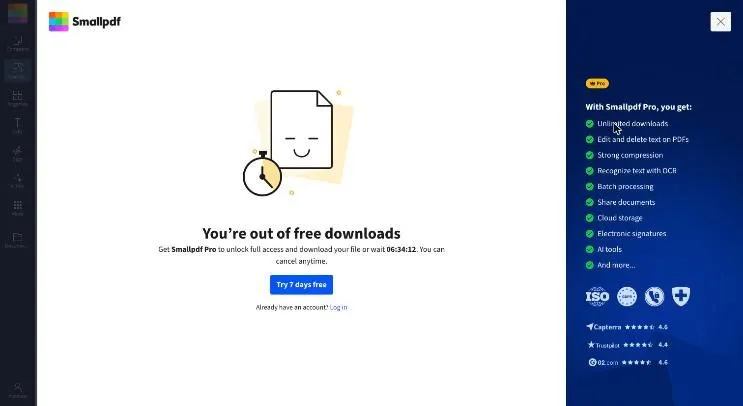
Smallpdf free OCR stops after a small number of downloads a day, and the number is not published. The OCR page says its tools are "free to use, though some limits apply", and the pricing page marks PDF OCR on the free plan with a "daily download limit". On 31 October 2026, with no sign-in, our first download worked. The second was refused with "You’re out of free downloads", an offer of Smallpdf Pro with a 7-day free trial, and a countdown of 06:34:12.
For one file a day that limit may never matter. For a folder of scans it decides your afternoon. FastOCR also caps images for visitors without an account, at a small daily number; a free account lifts it, so image OCR then has no daily cap. Scanned PDFs use a free monthly page allowance shown on the pricing page.
Smallpdf OCR, second download
 (opens full size)
Screenshot.
The dialog said
“You’re out of free downloads”
“Get Smallpdf Pro to unlock full access and download your file or wait 06:34:12.”
It appeared on our second download, with no sign-in and the free tool, on 31 October 2026.
FastOCR in any browser
- 1Open fastocr.org
- 2Drop in a photo
- 3Copy the text or download it
No account for 3 images a day. Sign in free for unlimited images.
Smallpdf vs PDF24: accuracy in OCR
PDF24 has the fuller accuracy record of the two, because Smallpdf stopped us after one page. We ran the same public-domain book pages through PDF24; on the six scripts shown (Arabic, Urdu, Bengali, Tamil, Chinese, English) it got 3.2% to 69.0% of characters wrong. FastOCR got 1.0% to 9.1% on those pages. Smallpdf got 99.1% of the Arabic page wrong, against 2.6% for FastOCR, and its other pages could not be downloaded. Every figure is the share of characters wrong, so lower is better. See also the full benchmark.
One page is a narrow sample. It shows that Smallpdf's automatic language handling missed an Arabic book scan on that day, not how it reads English or Chinese. Try your own page in both tools before a long job.
What FastOCR gives you instead
FastOCR shows the recognised text next to your page, so you can check and copy it before you download anything. Each image comes back as raw text, a single-page searchable PDF, a Word file and Markdown, with no sign-up and no watermark. Scanned PDFs come back searchable, and the text copies in the right order, including right-to-left Arabic, Urdu and Hebrew. It detects 100+ languages by itself, mixed pages included, so there is no language to pick. Once an image is read, you can translate its text or tidy it with AI Polish. The quickest test is the free OCR online uploader on the home page.
Smallpdf is a PDF toolbox with OCR inside. FastOCR is OCR first, with these free extras:
- Offline Mac and Windows apps in public beta, for files that must stay on your computer. They use the OCR built into macOS and Windows, so the scores on this page do not apply to them.
- A Chrome extension that copies text from anything on screen.
- PDF tools that run in your browser, so files stay on your device: merge, compress, split, sign and more.
- Bank statements to Excel, CSV and QuickBooks.
- A REST API, Python SDK and MCP server for AI agents, with LangChain and LlamaIndex loaders.
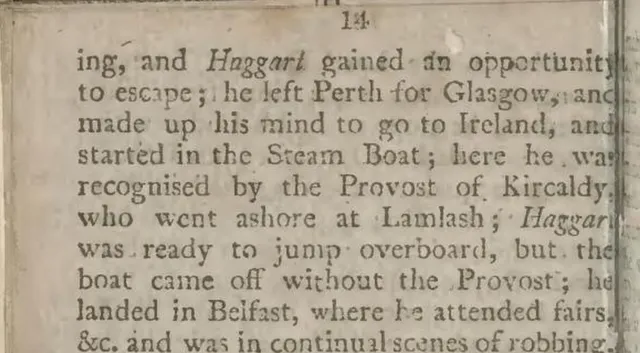
Photo of a page
 (opens full size)
Text FastOCR returned
ing, and Haggart gained an opportunity
to escape; he left Perth for Glasgow, and
made up his mind to go to Ireland, and
started in the Steam Boat; here he wa
recognised by the Provost of Kircaldy
who went ashore at Lamlash; HaggarHow we tested
- Pages: Wikimedia Commons book scans in the public domain or CC0, one per script. This page shows six of them: Arabic, Urdu, Bengali, Tamil, Chinese, English. The reference is the Wikisource transcription.
- Score: character error rate, the share of characters wrong, missing or extra after removing spaces, punctuation and Arabic diacritics, so lower is better. The reference differs from our own proofread key by 1% to 6%, so gaps under about 3 points are noise.
- Smallpdf: the free tool at smallpdf.com/pdf-ocr on 31 October 2026, no sign-in, optional cookies declined. It offered no language menu. We wrapped the Arabic scan in a one-page PDF, the way scanned PDFs usually arrive, and read the returned text layer with pdftotext. The Urdu download was refused as "out of free downloads", so the other pages have no score.
- PDF24: its free OCR PDF tool on 31 October 2026, no sign-in, language set by hand for each page.
- FastOCR: output from its production API on 25 October 2026. It got a smaller 500-pixel-wide image for the Arabic, Urdu and English pages; the other tools got 1,280 pixels.
- Smallpdf's limits, outputs and file handling come from its own pages, checked on 4 November 2026. Scans: Wikimedia Commons. Text: Wikisource.
Choose Smallpdf if
- You already pay for Smallpdf Pro or use its other PDF tools every week, and want OCR in the same place.
- You need to edit text inside a PDF, which its Pro plan lists next to OCR.
- You want uploads removed after one hour by default, unless you choose to save them.
- You make the odd PDF searchable, in a language you have checked it on, and one file a day is enough.
FAQ
Is Smallpdf good for OCR scanning?
For a single scanned PDF it is a reasonable choice: no sign-up, and a searchable PDF back. In our test its one scored page, an Arabic book scan, was 99.1% wrong (lower is better), and the second free download was refused. Test a page of your own before a long job.
Is Smallpdf OCR free?
Yes, with a cap. The OCR page says the tools are free to use though some limits apply, and the pricing page lists a daily download limit without a number. On 31 October 2026 our second free download was refused, with a wait of about 6.5 hours.
Does Smallpdf OCR need an account?
No. Its OCR page says no signups are needed. An account matters if you want to keep files past one hour or try Smallpdf Pro, which has a 7-day free trial. FastOCR also reads images without an account; PDFs need a free one.
Which languages does Smallpdf OCR read?
Its OCR page says it recognises text in many different languages but does not list them, and the tool showed us no language menu. Run one page in your language before a long file. FastOCR detects 100+ languages automatically, including pages that mix scripts.
Smallpdf vs PDF24: which is more accurate for OCR?
We can only score PDF24 fully: 3.2% to 69.0% of characters wrong across the six pages shown. Smallpdf got 99.1% of the Arabic page wrong, then its free downloads ran out. FastOCR got 1.0% to 9.1% on the same six. Lower is better.
Can Smallpdf turn a scanned PDF into Word?
Yes, in two steps. The OCR tool returns a searchable PDF, and its page points you to the separate PDF to Word converter for a .docx file. FastOCR offers raw text, Word and Markdown downloads from the same upload as the searchable PDF.
What is a free alternative to Smallpdf OCR?
FastOCR. Images need no sign-up and carry no watermark, and each comes back as text, a searchable PDF, Word and Markdown. Scanned PDFs need a free account and come back searchable, with right-to-left text that copies in the right order.
Method
Smallpdf facts come from its own OCR and pricing pages, checked on 4 November 2026; a fact it does not state is shown as Not stated, never as No. Accuracy is the share of characters wrong against the Wikisource text, lower is better, on public-domain scans run on 31 October 2026. Smallpdf was scored on one page only. Details are in how we tested.
Change log
- 18 July 2026: First published.
- 31 October 2026: Added our Arabic test of Smallpdf OCR and its free download limit.
- 4 November 2026: Smallpdf facts re-checked on its own pages; moved to the shared comparison format.