Best Free Image to Text Converter in 2026: 12 Online Tools Compared
Short answer
Among the best online tools for converting image to text, we pick FastOCR (we make it): every image to text upload returns text, a searchable PDF, Word and Markdown in 100+ languages, no sign-up. imagetotext.info, the closest online image text extractor, was level with it on Arabic and Urdu; Google Lens suits phone photos.
By the FastOCR team · Updated 4 November 2026 · Accuracy test run 31 October 2026
We make FastOCR. Accuracy figures come from our own test of each tool we scored, ours included, on the same scans; other facts link to each tool's own pages. How we tested
Try it here
Drop your file here
PDF, PNG, JPG, WebP, BMP, HEIC
PDF up to 1 GB · images up to 20 MB
Tips for a clear photo
- Lay the page flat.
- Use even light, with no shadows.
- Turn off the flash to avoid glare.
- Fill the frame with the page.
Verdict
Pick FastOCR if
- You want more than copied text: every image comes back as text plus a searchable PDF, Word and Markdown, with no account and no watermark.
- Your image is Arabic, Urdu, Bengali, Tamil or Chinese, or mixes scripts. FastOCR detects the language itself, and on those pages it got 1.0% to 9.1% of characters wrong in our test (lower is better).
- You want to translate the text or tidy it with AI Polish, or grab text off your screen with the Chrome extension.
- A script or an AI agent has many images to read: there is a REST API, a Python SDK and an MCP server.
Pick another tool if
- You want a free API to prototype with: OCR.space has one, with a 1 MB file cap and a watermark on searchable PDFs.
- You only need a few words off a sign or a menu: Google Lens or Apple Live Text is already on your phone.
- You want Excel or RTF back from a Latin-script, Chinese, Japanese or Korean scan as a guest: OnlineOCR.net.
- Your scans already sit in a OneNote notebook: right-click the picture there and copy its text.
Best for
- Text plus a searchable PDF, Word and Markdown from one image, in 100+ languages: FastOCROur tool
No account and no watermark, and the language is detected for you. On our Urdu page it got 9.1% of characters wrong where Tesseract got 55.3% (lower is better).
- Text, Word or Markdown from one image, also with no account: imagetotext.info
No registration, and on our Arabic, Urdu and Bengali pages it stayed within about a point and a half of FastOCR, which was slightly lower on all three.Source
- A free API to prototype with:
- Words from a sign, a menu or a page, through the phone camera: Google Lens
Google's page says Lens copies text to your phone or computer and translates it in over 100 languages.Source
- Copying text out of photos on an iPhone: Apple Live Text
Built into iOS 15 and later on the iPhone XS, XR and newer models.Source
- Word or Excel from a Latin-script, Chinese, Japanese or Korean scan, as a guest: OnlineOCR.net
Guests convert 5 files an hour, up to 15 MB each, with no signup.Source
- A long run of images with no account:
- One page in a language few tools list:
- An image turned into an ODT, DOCX or PowerPoint file:
- A short job that needs Word or a searchable PDF back:
- Scans already kept in a OneNote notebook: Microsoft OneNote
Right-click a picture and choose Copy Text from Picture.Source
- A searchable PDF from a scan that is not right-to-left, with no registration:
Comparison table
| Tool | Account needed | Free limit, as advertised | What you get back | Non-Latin scripts named |
|---|---|---|---|---|
| FastOCR (our tool)Our tool | Account neededNo for images; PDFs need a free account | Free limit, as advertisedA small daily image cap until you sign in; see pricing | What you get backText, searchable PDF, Word, Markdown | Non-Latin scripts named100+ languages, detected automatically |
| imagetotext.info | Account neededNoSource | Free limit, as advertisedOne file per upload; more needs an upgradeSource | What you get backText, Word, HTML, MarkdownSource | Non-Latin scripts namedArabic, Chinese, Japanese, Korean, ThaiSource |
| OCR.space | Account neededNoSource | Free limit, as advertised5 MB per documentSource | What you get backText, JSON, searchable PDFSource | Non-Latin scripts namedArabic, Persian, Hindi, Tamil, Chinese, Hebrew; Urdu and Bengali not namedSource |
| Google Lens | Account neededNot statedSource | Free limit, as advertisedNot statedSource | What you get backCopied or translated textSource | Non-Latin scripts namedTranslates in over 100 languagesSource |
| Apple Live Text | Account neededNot statedSource | Free limit, as advertisedNot statedSource | What you get backCopy, share, look up or translateSource | Non-Latin scripts namedChinese, Japanese, Korean, ThaiSource |
| OnlineOCR.net | Account neededNo, as a guestSource | Free limit, as advertisedGuests: 5 files an hour, 15 MB eachSource | What you get backWord, Excel, text, PDF, RTFSource | Non-Latin scripts namedChinese, Japanese, Korean; Arabic, Urdu, Hindi and Bengali not listedSource |
| NewOCR | Account neededNoSource | Free limit, as advertisedNo limit on the number of filesSource | What you get backTXT, DOC, PDFSource | Non-Latin scripts named122 languages, including Arabic, Urdu, Persian, Hindi, Bengali, TamilSource |
| i2OCR | Account neededNot statedSource | Free limit, as advertisedOne image or PDF page per runSource | What you get backText, Word, HTML, searchable PDFSource | Non-Latin scripts named128 languages, including Arabic, Urdu, Persian, Hindi, Bengali, TamilSource |
| Img2Go | Account neededNoSource | Free limit, as advertisedA limited number of files a daySource | What you get backDOC, DOCX, PDF, TXT, RTF, ODT, HTML, PPTXSource | Non-Latin scripts namedArabic, Chinese, Japanese, Korean (13 OCR languages)Source |
| Convertio | Account neededNot for the first 10 pagesSource | Free limit, as advertised10 pages, then sign upSource | What you get backWord, searchable PDF, textSource | Non-Latin scripts namedArabic, Chinese, Hebrew, Thai; Urdu, Persian, Hindi and Bengali not listedSource |
| Microsoft OneNote | Account neededNot statedSource | Free limit, as advertisedNot statedSource | What you get backText copied from the pictureSource | Non-Latin scripts namedNot statedSource |
| PDF24 | Account neededNoSource | Free limit, as advertisedNo time restrictions; funded by adsSource | What you get backSearchable PDF or PDF/ASource | Non-Latin scripts namedArabic, Urdu, Persian, Hindi, Bengali, Tamil, Chinese, HebrewSource |
Why FastOCR
Photos and screenshots
Every image upload gets raw text and a single-page searchable PDF, plus Word and Markdown.
See Photos and screenshotsLanguages
100+ languages, detected automatically, including mixed pages.
Share of characters wrong on our evidence scans (lower is better): Arabic 2.6%, Urdu 9.1%, Bengali 7.4%, Tamil 2.2%, Chinese 1.0%.
See LanguagesFree use
Images: free, no sign-up, no watermark. PDFs: free account.
See Free useTranslation and AI Polish
Translate or clean up the text of a finished image.
See Translation and AI PolishChrome extension
Copy text from anything on screen.
See Chrome extension
Proof
imagetotext.info was level with FastOCR on Arabic and Urdu. The clear gaps are with Tesseract and PDF24 on Urdu. Tools we could not run are not in the charts. Lower is better.
The scan: a page of the Urdu book Tota Kahani (written 1801)
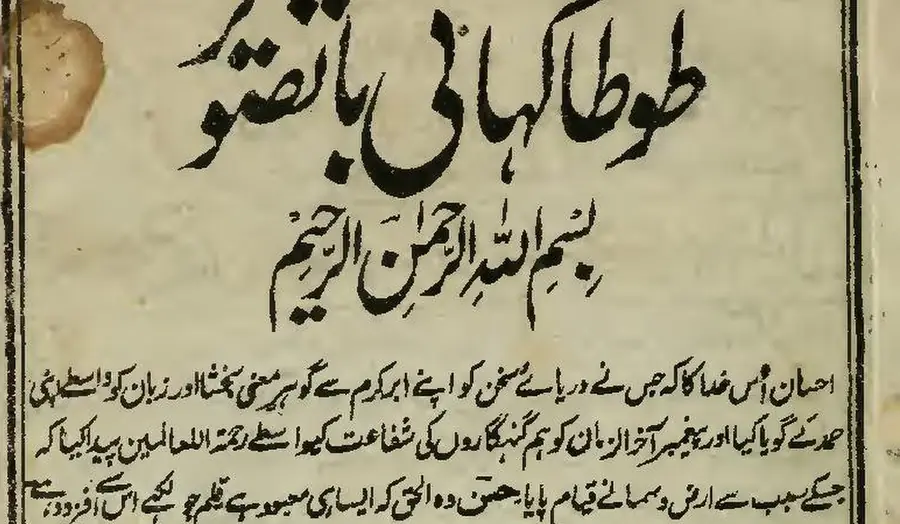
First body line, as printed (Wikisource transcription)
احسان اُس خدا کا کہ جس نے دریائے سخن کو اپنے ابر کرم سے گو ہرِ معنی بخشا اور زبان کو واسطے اپنی
- 9.1% of characters wrong
FastOCR
published by us
احسان اُس خدا کا کہ جس نے دریائے سخن کو اپنے ابر کرم سے گو ہر معنی بخشا اور زبان کو واسطے اپنی
- 9.2% of characters wrong
imagetotext.info
free web tool
احسان اُس خدا کا کہ جس نے دریائے سخن کو اپنے ابر کرم سے گو ہر معنی بخشا اور زبان کو واسطے اپنی
- 30.4% of characters wrong
OCR.space
default Engine 2
احسان أس مداكاكيج سنءريات سخن كواب ابركرم ← كوبر معى تختا اورزيان كوداسطيى
- 55.3% of characters wrong
Tesseract 5.5.4
the engine NewOCR says it uses
ا احمان اس دا اجس ےه در را سخ نکو ان ارک سےکوس ین یناد زا نک ری
- 99.6% of characters wrong
OnlineOCR.net
no Urdu option
tA)K11 tAirk.,....11.30,t4 ikitt r CIO 4 %;114iiii
% of characters wrong by script, lower is better
- FastOCR
- OCR.space Engine 3
- imagetotext.info
- OCR.space default Engine 2
- Tesseract 5.5.4 (the engine NewOCR says it uses)
- PDF24
- Chinese
- FastOCR 1.0%OCR.space E3: No scoreOCR.space E2 3.0%Tesseract 71.9%PDF24 3.2%
- Urdu
- FastOCR 9.1%OCR.space E3 19.6%imagetotext.info 9.2%OCR.space E2 30.4%Tesseract 55.3%PDF24 69.0%
- Bengali
- FastOCR 7.4%OCR.space E3 11.2%imagetotext.info 7.9%OCR.space E2 100.0%Tesseract 31.7%PDF24 18.6%
- Arabic
- FastOCR 2.6%OCR.space E3 2.9%imagetotext.info 2.9%OCR.space E2: Not supportedTesseract 20.4%PDF24 35.5%
- Tamil
- FastOCR 2.2%OCR.space E3: No scoreOCR.space E2 99.8%Tesseract 8.5%PDF24 9.2%
- English
- FastOCR 3.3%OCR.space E3: No scoreOCR.space E2 4.5%Tesseract 8.5%PDF24 10.1%
Image to text accuracy: one test, six scripts
We put public-domain book scans, one each in Arabic, Urdu, Bengali, Tamil, Chinese and English, through every free image to text tool we could reach. Each output was scored as the share of characters wrong against the page's Wikisource text, so lower is better. Of the six scripts shown (Arabic, Urdu, Bengali, Tamil, Chinese and English), FastOCR had the lowest or tied-lowest error rate on 6 (gaps under 3 points count as ties). The closest rival was imagetotext.info, which stayed within about a point and a half of FastOCR on Arabic, Urdu and Bengali. Most of FastOCR's leads are within the 3-point noise; the clear gaps are with the free engines many sites run: on Urdu, Tesseract got 55.3% and PDF24 69.0% wrong, against FastOCR's 9.1%. On the English page, every tool we scored got between 3.3% and 10.1% of characters wrong, so for a clean Latin-script photo most converters will do. The spread opens on other scripts, where a missing language turns a page into the wrong alphabet.
Where other tools did as well or worse, lower is better in every number:
- OCR.space Engine 3 got 19.6% of Urdu wrong.
- OCR.space's default Engine 2 turned away the Arabic page.
- PDF24 got 69.0% of the Urdu page wrong and Tesseract 55.3%, even with the right language picked.
- OnlineOCR.net has no Urdu option, so the Urdu page came back 99.6% wrong.
The tools differ more in what they hand back. FastOCR returns text, a searchable PDF, Word and Markdown from the same image. imagetotext.info gives text, Word, HTML and Markdown; OCR.space and PDF24 make searchable PDFs; Google Lens and Live Text let you copy the words. Test dates and caveats are in the method.
1. FastOCR (our tool)
- Best for
- One upload that returns text, a searchable PDF, Word and Markdown, in any of 100+ languages, with no account.
- Watch out for
- There is a small daily image cap until you sign in, and translation and AI Polish work on finished images, not PDFs.
FastOCR is a free image to text converter that runs in the browser. Drop in a photo, screenshot or scan and you get the raw text plus a single-page searchable PDF, with Word and Markdown downloads. It works out the language on its own across 100+ languages, including pages that mix scripts. Images need no sign-up and carry no watermark.
Once the text is read, you can translate it or tidy it with AI Polish. Both work on finished images, not on PDFs.
Other ways to get text out with FastOCR:
- The Chrome extension copies text from anything on screen: press the shortcut and drag over the words.
- Free offline apps for Mac and Windows, in public beta, for files that should not leave your computer.
- Scanned PDFs made searchable, with text that copies in reading order, right-to-left included.
- An OCR API with a Python SDK and an MCP server, for scripts and AI agents.
In our test: FastOCR got 2.6% of the Arabic page's characters wrong, 9.1% of the Urdu page and 1.0% of the Chinese page. Lower is better.
Searchable PDF that copies in reading order
احسان اُس خدا کا کہ جس نے دریائے سخن کو اپنے ابر کرم سے گو ہر معنی بخشا اور زبان کو واسطے اپنی
Select and paste: Urdu, Arabic and Hebrew come out right to left, and two-column pages come out column by column.
Word file with paragraphs and tables
| Item | Qty | Total |
| Paper | 4 | 18.00 |
| Toner | 1 | 64.50 |
Prose reflows into editable paragraphs; ruled tables come back as real Word tables. PDF to Word
Bank statement to Excel, CSV or QuickBooks
| Date | Description | Amount | Balance |
| 09/01 | Rent payment | -1,450.00 | 968.65 |
| 09/02 | Payroll deposit | 2,386.40 | 3,355.05 |
| 09/04 | Grocery store | -84.17 | 3,270.88 |
One row per transaction, for US and UK statements in English (example rows invented). Bank statement converter
2. imagetotext.info
- Best for
- A quick image to text or Markdown job with no account, including Arabic and Urdu pages.
- Watch out for
- No searchable PDF is listed, and several files at once needs an upgrade. Its home page does not list Urdu or Bengali.
imagetotext.info says it does not ask users to register. It takes JPG, PNG, GIF, HEIC and PDF files and gives back plain text, a Word file, HTML or Markdown. Uploading several files at once needs an upgrade, and its paid plan lists 'no ads and captcha' as a feature. The language sentence on its home page names Arabic, Chinese, Japanese, Korean and Thai.
In our test: it was the free tool closest to FastOCR. It got 2.9% of the Arabic page's characters wrong, 9.2% of Urdu and 7.9% of Bengali, against FastOCR's 2.6%, 9.1% and 7.4%. Gaps that small sit inside the noise of the reference text. Lower is better.
Source: imagetotext.info, checked 4 November 2026. Compare: FastOCR vs imagetotext.info.
3. OCR.space
- Best for
- Developers trying a free API, once you switch to Engine 3.
- Watch out for
- The default Engine 2 turned away our Arabic page, so choose the engine yourself. Urdu and Bengali are not on its language table.
OCR.space's web tool is free with no registration and takes images or PDFs up to 5 MB. It returns text, JSON or a searchable PDF, offers automatic language detection, and says files are deleted right after processing. Engine 3 adds more than 200 languages. The free API plan caps files at 1 MB and marks its searchable PDFs with a watermark.
In our test: Engine 3 got 2.9% of the Arabic page's characters wrong, against FastOCR's 2.6%. On Urdu it got 19.6%. Lower is better.
Source: OCR.space API, checked 4 November 2026. Compare: FastOCR vs OCR.space.
4. Google Lens
- Best for
- Copying or translating a few words from a sign, a menu or a page through your phone camera.
- Watch out for
- Google's pages describe copying and translating text, not saving a Word file or a searchable PDF.
Google Lens reads text through your camera or from a photo. Google's Lens page says you can copy the text to your phone or computer and translate menus, signs and handwriting in over 100 languages. Its Photos help page says you tap and select the words you want to copy.
In our test: not run, so this page gives no accuracy number for Lens.
Source: Google Lens, checked 4 November 2026.
5. Apple Live Text
- Best for
- iPhone owners who want to copy, look up or translate text in a photo or the camera view.
- Watch out for
- Apple says Live Text isn't available in all regions or languages, and its feature list does not name Arabic, Urdu, Persian, Hindi, Bengali or Tamil.
Live Text is built into iOS 15 and later on the iPhone XS, XR and newer models. Apple's guide says you can copy, share, look up and translate text that appears in photos and in the camera. Apple's feature availability page names Chinese, Japanese, Korean and Thai among its languages.
In our test: not run; Live Text works on the phone, not on uploaded files.
Source: Apple support, checked 4 November 2026. Compare: FastOCR vs Apple Live Text.
6. OnlineOCR.net
- Best for
- A Latin-script, Chinese, Japanese or Korean scan you want back as Word, Excel or RTF, without signing up.
- Watch out for
- Guests get 5 files an hour, and the language menu does not list Arabic, Urdu, Persian, Hindi, Bengali or Tamil.
OnlineOCR.net runs in guest mode with no signup: 5 files an hour, up to 15 MB each. It supports 46 recognition languages and returns Word, Excel, plain text, PDF or RTF. ZIP uploads are for registered users only, and the page carries advertisements.
In our test: the menu had no Urdu, so the Urdu page was read with the default English setting and came back as Latin letters, 99.6% of characters wrong (lower is better).
Source: OnlineOCR.net, checked 4 November 2026. Compare: FastOCR vs OnlineOCR.net.
7. NewOCR
- Best for
- A long run of images with no account, in one of its 122 listed languages.
- Watch out for
- Downloads are TXT, DOC or PDF; Markdown and DOCX are not listed. Its CAPTCHA kept us from running it.
NewOCR needs no account or install and says there is no limit on the number of files you upload. It lists 122 recognition languages, including Arabic, Urdu, Persian, Hindi, Bengali and Tamil, and accepts multi-page TIFF, PDF and DjVu files as well as images. Its page says files are removed from the server after use and that the service is based on the Tesseract OCR engine.
In our test: NewOCR sits behind a CAPTCHA, so we ran Tesseract 5.5.4, the engine its page names, with the right language pack. Tesseract got 8.5% of the English page wrong but 55.3% of Urdu and 71.9% of Chinese. Lower is better, and NewOCR's own settings may differ.
Source: NewOCR, checked 4 November 2026.
8. i2OCR
- Best for
- One page in a less common language: it lists 128, more than FastOCR's 100+.
- Watch out for
- Free use is one image or one PDF page per run, and bulk OCR needs a premium plan.
i2OCR reads one image or one PDF page at a time for free. It lists 128 languages, including Arabic, Urdu, Persian, Hindi, Bengali and Tamil, and offers downloads as text, Word, HTML, PDF and searchable PDF. Its FAQ allows images up to 20 MB, says uploads are deleted within 30 minutes, and warns that handwriting is read less accurately than typed text.
In our test: its CAPTCHA kept us from running it, so there is no score.
Source: i2OCR FAQ, checked 4 November 2026.
9. Img2Go
- Best for
- Turning an image into an editable office file such as DOCX, ODT or PowerPoint, with no account.
- Watch out for
- Its OCR covers 13 languages, and Urdu, Persian, Hindi and Bengali are not among the ones it lists. Free users get a limited number of files a day.
Img2Go's Convert image to document tool runs OCR as an option. You can convert without creating an account and save the result as DOC, DOCX, PDF, TXT, RTF, ODT, HTML or PowerPoint. Its OCR supports 13 languages, including Arabic, Chinese, Japanese and Korean. Batch processing and an ad-free page come with the paid plans.
In our test: not run; the facts here come from its own pages.
Source: Img2Go pricing, checked 4 November 2026.
10. Convertio OCR
- Best for
- A short multi-page job where you want Word or a searchable PDF back.
- Watch out for
- The OCR page shows 10 available pages, then asks you to sign up. Urdu, Persian, Hindi, Bengali and Tamil are not in its language menu.
Convertio's OCR page reads JPG, BMP, GIF and PDF files and exports Word, searchable PDF and text. Its language menu has about 75 entries, including Arabic, Chinese, Hebrew, Japanese, Korean and Thai. Its security page says output files are deleted after 24 hours.
In our test: not run; compared on its published facts only.
Source: Convertio security, checked 4 November 2026.
11. Microsoft OneNote
- Best for
- Pictures and printouts you already keep in OneNote notebooks.
- Watch out for
- Microsoft's help page says some results can take 24 to 48 hours, and the command may not appear on the menu right away.
In OneNote you right-click a picture and choose Copy Text from Picture, then paste the text wherever you need it. It works on pictures and file printouts inside a notebook, so it suits people who already file their scans there.
In our test: not run, so no accuracy number is given.
Source: Microsoft support, checked 4 November 2026.
12. PDF24 OCR
- Best for
- A free searchable PDF from a scan that is not right-to-left, with no registration.
- Watch out for
- You get a searchable PDF rather than plain text, and you pick the language by hand. Our Urdu page came out poorly.
PDF24's OCR tool says no registration is required, it is free thanks to advertising, and files are deleted from its server after one hour. Its language list includes Arabic, Urdu, Persian, Hindi, Bengali, Tamil, Chinese and Hebrew, and you choose one before you start. You download a searchable PDF or PDF/A.
In our test: we uploaded the scans as JPG images. PDF24 got 10.1% of the English page wrong and 3.2% of Chinese, but 69.0% of Urdu. Lower is better.
Source: PDF24 OCR, checked 4 November 2026. Compare: FastOCR vs PDF24.
How an online image text extractor works
An online image text extractor sends your picture to a server, finds the lines of text on it, and decides which letters they are for the script on the page. You get plain text back and, from some tools, a file such as Word or a searchable PDF. The middle step is where tools part ways. Some ask you to choose the language first, as PDF24 and Convertio do; others detect it, as FastOCR, Google Drive and OCR.space's auto setting do. If your script is missing from a tool's list, the letters come back in the wrong alphabet, which is what OnlineOCR.net did with our Urdu page. Phone tools such as Google Lens and Live Text do the same job on the camera view instead of an upload. To see the steps end to end, try image to text on one of your own pictures.
Free image to text tools for business
For business use, three things matter more than the free tier: how many images you need to send, where the files go, and which format your team works in. For a handful of images, any browser tool on this page will do. For hundreds, use an API rather than a web form.
- Volume. FastOCR has a REST API, Python SDK and MCP server plus LangChain and LlamaIndex loaders, with free monthly pages shared with PDFs on the website. OCR.space also offers a free API plan for testing.
- Files that must stay in-house. The free FastOCR apps for Mac and Windows, in public beta, read files offline and never upload them.
- Formats. FastOCR gives Word and Markdown for documents, and bank statements to Excel, CSV and QuickBooks.
- Privacy. Every web tool receives the image. Read its privacy page before you upload client documents; we make no compliance claims for any tool.
Tips for a cleaner image to text result
- Shoot the page flat and square, in even light, with no shadow across the text.
- Crop to the text you need; table borders and page edges add stray characters.
- Save screenshots as PNG, since JPEG blur around small letters causes misreads.
- If a tool asks for a language, choose the real one; the wrong one swaps the alphabet.
- Read the result once against the image before you paste it anywhere that matters.
Two more free options: Google Drive and Tesseract
Google Drive reads text when you open a JPEG, PNG or GIF with Google Docs, and it detects the language itself. Its help page says the file should be 2 MB or smaller and that lists, tables, columns and footnotes are not likely to be detected. You get a Google Doc rather than a searchable PDF.
Tesseract is free, open-source OCR that reads more than 100 languages, and it is the engine NewOCR names. There is no built-in window, its documentation says, so it runs from a command line or inside other software.
When another tool is the better choice
- You want a free API to prototype with: OCR.space has one, though you pick the engine by hand.
- You need a rare language: i2OCR lists 128 and NewOCR 122, more than FastOCR's 100+, so check your language on each list.
- You are pointing a phone at a sign or a menu: Google Lens or Live Text is already on the device.
- You keep scans in OneNote, or you want Excel back (OnlineOCR.net) or PowerPoint back (Img2Go): those tools do both.
- imagetotext.info already works for you: it was about as accurate on our Arabic, Urdu and Bengali pages, so accuracy alone is no reason to switch.
FAQ
What is the best online image text extractor?
For most images, FastOCR (we make it): it reads 100+ languages with no sign-up and returns text, a searchable PDF, Word and Markdown. imagetotext.info was about as accurate on our Arabic and Urdu pages, and Google Lens is handiest for phone photos.
What are the free image to text tools I can use for my business?
FastOCR, imagetotext.info, OCR.space, NewOCR and OnlineOCR.net all work in the browser with no account. For volume, use an API: FastOCR offers a REST API, a Python SDK and an MCP server with free monthly pages, and OCR.space has a free API plan. Check each privacy policy before uploading client files.
How do online platforms that extract text from an image compare?
They differ in four ways: the languages they list, the free limits, the files they return, and whether you must sign up. Accuracy differs most on non-Latin scripts. On our English page every scored tool got 3.3% to 10.1% of characters wrong; on Urdu the range was 9.1% to 99.6%. Lower is better.
Can I convert an image to text for free without signing up?
Yes. FastOCR, imagetotext.info, OCR.space, NewOCR, Img2Go and PDF24 say no account is needed, and OnlineOCR.net lets guests convert 5 files an hour. Convertio asks you to sign up after 10 pages. FastOCR's no-account images have a small daily cap that signing in lifts.
Which free converter reads Arabic or Urdu images?
In our test, FastOCR got 2.6% of the Arabic page's characters wrong and 9.1% of Urdu; imagetotext.info got 2.9% and 9.2%, a gap inside the noise. OCR.space Engine 3 matched on Arabic but got 19.6% of Urdu wrong. OnlineOCR.net does not list either script. Lower is better.
How accurate are free image to text converters?
It depends on the script more than the tool. FastOCR had the lowest or tied-lowest error rate on 6 of the six pages shown, from 1.0% wrong on Chinese to 9.1% on Urdu. Tools without your script on their list can get almost every character wrong. Lower is better.
What are the newest online tools for converting images to text?
FastOCR's Chrome extension, listed in the Chrome Web Store since 16 October 2026, copies text from anything on screen. FastOCR's free offline Mac and Windows apps are in public beta. Google Lens and Apple Live Text read text straight from the phone camera. We re-checked every tool's own pages on 4 November 2026.
Is it safe to upload images to an online converter?
Every web tool receives your image, so read its policy first. FastOCR deletes uploads 30 days after upload, as its privacy policy says. OCR.space says files are deleted right after processing, i2OCR within 30 minutes and PDF24 after one hour. For files that must stay local, use an offline app.
Method
- Test dates: FastOCR's text came from its production API on 25 October 2026, and every other tool was run on 31 October 2026. Each tool's own pages were checked on 4 November 2026, and a fact a page does not state is shown as Not stated, never as No.
- Pages: public-domain scanned book pages from Wikimedia Commons, one per script. The reference is each page's Wikisource text.
- Scoring: spaces, punctuation and Arabic diacritics were stripped first, then we counted the share of characters wrong, so lower is better. Wikisource differs from our own proofread key by 1 to 6 points, so gaps under about 3 points are noise.
- FastOCR's Arabic, Urdu and English scans were 500 pixels wide; the other tools got 1,280-pixel versions.
- Scored: FastOCR, imagetotext.info, OCR.space Engines 2 and 3 on the public demo key, OnlineOCR.net on Urdu, PDF24, and Tesseract 5.5.4 standing in for NewOCR. Empty Engine 3 results on Tamil, Chinese and English may be rate limiting and are not counted.
- Not run: i2OCR and NewOCR (CAPTCHA), Img2Go, Convertio, Google Lens, Live Text, OneNote and Google Drive. They are compared on their own published facts only. No handwriting, speed or phone-camera test was run.
Change log
- 10 April 2026: First published.
- 1 November 2026: Added the script accuracy test.
- 4 November 2026: Competitor facts re-checked on their own pages. Added Google Lens, Apple Live Text, OneNote, NewOCR, i2OCR, Img2Go and Convertio as full entries.