How to Extract Text from an Image in WhatsApp
Updated 31 October 2026 · 6 min read
To extract text from an image in WhatsApp (WhatsApp OCR), save the image first. Then use Live Text on an iPhone, Google Lens on Android, or an OCR website such as FastOCR. We found no WhatsApp Help Center page about copying text from images, so this page does not rely on WhatsApp doing it.
Use FastOCR when the chat is long, or when it is in Urdu or Arabic. The images are uploaded to process; see privacy.
Can WhatsApp copy text from an image itself?
We searched WhatsApp's Help Center on 31 October 2026 and found no article about copying or selecting text in an image. Do not rely on WhatsApp doing it: saving the image and using another tool always works.
Copy the text with your phone
iPhone: Live Text
Save the image to Photos and open it there. Touch and hold a word, move the grab points, then tap Copy (or Select All). Apple says this needs an iPhone XS, XR or later with iOS 15 or later. It reads on the phone. Apple lists the Live Text languages on its own page; when we checked it for our iPhone article, Arabic and Urdu were not on it.
Android: Google Lens
Save the image to Google Photos and open it. Tap More, then Google Lens, then tap and select the words to copy. These steps are from Google's help page. We have not tested Lens on chat screenshots or on any script.
Both are free and quick for a few lines in a common language. They are the better pick for a short message you want to copy right now, because nothing leaves your phone.
Convert a WhatsApp image to text with FastOCR
Save the image, then open Screenshot to Text or Image to Text in any browser. Try 3 images a day without an account. Sign in for unlimited free image OCR.
1. Save the image
Save the photo or screenshot from WhatsApp to your gallery, or take a screenshot of the chat.
2. Upload it
Open fastocr.org on your phone or computer and choose the image.
3. Copy the text
The text appears on the results page. Copy it or download it.
When FastOCR is the better fit
- Long chats. Take screenshots of the whole conversation and read them in one go on a computer.
- Urdu or Arabic. Apple's Live Text list did not include them when we checked. See the test below.
- Many screenshots. Upload them one after another. For large volumes, the FastOCR API takes images and includes 20 free pages a month.
- A bigger screen. Copy and edit the text on a computer.
Urdu and Arabic chats
Right-to-left text is where tools differ most. On 31 October 2026 we ran a scanned Urdu book page through free OCR tools; FastOCR's output on that page came from its production API on 25 October. We scored each by character error rate: the share of characters wrong, so lower is better. FastOCR got 9.1% wrong. Tesseract got 55.3% wrong.
The scan: a page of the Urdu book Tota Kahani (written 1801)
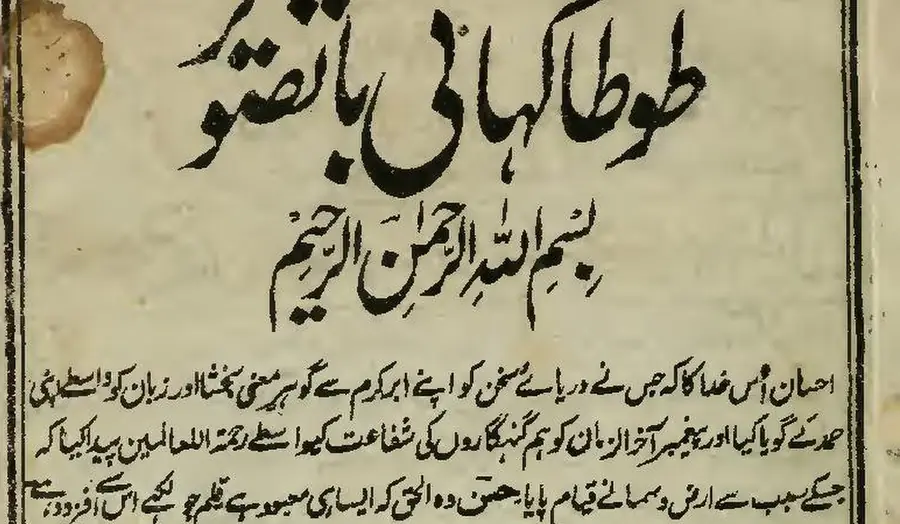
First body line, as printed (Wikisource transcription)
احسان اُس خدا کا کہ جس نے دریائے سخن کو اپنے ابر کرم سے گو ہرِ معنی بخشا اور زبان کو واسطے اپنی
- 9.1% of characters wrong
FastOCR
published by us
احسان اُس خدا کا کہ جس نے دریائے سخن کو اپنے ابر کرم سے گو ہر معنی بخشا اور زبان کو واسطے اپنی
- 9.2% of characters wrong
imagetotext.info
free web tool
احسان اُس خدا کا کہ جس نے دریائے سخن کو اپنے ابر کرم سے گو ہر معنی بخشا اور زبان کو واسطے اپنی
- 30.4% of characters wrong
OCR.space
default Engine 2
احسان أس مداكاكيج سنءريات سخن كواب ابركرم ← كوبر معى تختا اورزيان كوداسطيى
- 55.3% of characters wrong
Tesseract 5.5.4
the engine NewOCR says it uses
ا احمان اس دا اجس ےه در را سخ نکو ان ارک سےکوس ین یناد زا نک ری
- 99.6% of characters wrong
OnlineOCR.net
no Urdu option
tA)K11 tAirk.,....11.30,t4 ikitt r CIO 4 %;114iiii
Fair note: this is a book scan, not a chat. We have not measured WhatsApp screenshots, which are cleaner but have bubbles, emoji and mixed scripts. The result shows how each tool handles the script. See the Urdu OCR comparison for more.
Tips for better results
- Save the original image instead of a screenshot of a screenshot. Extra copies lose sharpness.
- Crop out the status bar and menus so you only get the message text.
- Try light mode. Dark backgrounds may read slightly worse. We did not measure this.
- Check emoji and names. Emoji are often skipped. Read the result once before you use it.
- Keep the order. For a long chat, number your screenshots so you can join the text in order.
Export the chat instead, if you can
WhatsApp can export a chat as a text file. On Android, open the chat, tap More options, then More, then Export chat. On iPhone, open the chat, tap the contact or group name, then Export Chat. See WhatsApp's guide. That copies the text exactly. Use OCR for images and screenshots that you cannot export.
Privacy
FastOCR uploads your image to its servers to read it. Our privacy policy says uploaded files and OCR results are automatically and permanently deleted 30 days after upload. Live Text reads on the phone, so it is the choice for chats you do not want to upload.
Frequently asked questions
Can WhatsApp copy text from an image?
We found no page in WhatsApp's Help Center that describes copying text from an image, so do not count on it. The reliable route is to save the image and use your phone's built-in tool or an OCR website.
How do I copy text from an image on an iPhone?
Save the image to Photos and open it there. Touch and hold a word, move the grab points, then tap Copy, or tap Select All. Apple says this is Live Text and needs an iPhone XS, XR or later with iOS 15 or later.
How do I copy text from an image on Android?
Save the image to Google Photos, open it, tap More, then Google Lens, and select the words you want to copy. These steps are from Google's Google Photos help page.
How do I convert a WhatsApp image to text?
Save the image, then upload it to FastOCR in a browser. When it finishes you can copy or download the text. Try 3 images a day without an account. Sign in for unlimited free image OCR.
Does it work for Urdu or Arabic chats?
FastOCR reads both. We scored it on a scanned Urdu page and it got 9.1% of the characters wrong (lower is better). That was a book scan, not a chat screenshot, and we have not measured chat screenshots. Our iPhone article explains that Arabic and Urdu were not on Apple's Live Text list when we checked.
Can I extract text from many screenshots?
On the website, upload them one after another. For large volumes, the FastOCR API takes images and includes 20 free pages a month.
Is it private to upload my chat screenshots?
The images are uploaded to our servers so they can be processed. Our privacy policy says uploaded files and OCR results are automatically and permanently deleted 30 days after upload. Do not upload chats you are not willing to share with a service.
Is there a way to get a WhatsApp chat as text without OCR?
Yes. WhatsApp can export a chat as a text file. On Android, open the chat, tap More options, then More, then Export chat. On iPhone, open the chat, tap the contact or group name, then tap Export Chat. If you can export, do that instead, because it copies the text exactly. OCR is for images and screenshots you cannot export.
Have a WhatsApp image to read?
Try 3 images a day without an account. Sign in for unlimited free image OCR.