OCR for iPhone in 2026: The Best OCR App for iPhone, Plus an iPhone OCR Library
Short answer
The best OCR app for iPhone depends on the text. Live Text, built into iOS, copies words from a photo in the languages Apple names. FastOCR (we make it) is a website, not an app: in Safari it reads a photo or PDF, Arabic, Urdu and Bengali included, and returns text, a searchable PDF, Word or Markdown. Developers start with the Vision framework.
By the FastOCR team · Updated 4 November 2026 · Accuracy test run 31 October 2026
We make FastOCR. Accuracy figures come from our own test of each tool we scored, ours included, on the same scans; other facts link to each tool's own pages. How we tested
Try it here
Drop your file here
PDF, PNG, JPG, WebP, BMP, HEIC
PDF up to 1 GB · images up to 20 MB
Tips for a clear photo
- Lay the page flat.
- Use even light, with no shadows.
- Turn off the flash to avoid glare.
- Fill the frame with the page.
Verdict
Pick FastOCR if
- Your text is Arabic, Hindi, Urdu, Persian or Bengali, scripts that the iOS Live Text list does not name.
- You have a PDF, or you want a searchable PDF, Word or Markdown file instead of copied words.
- Across our Urdu, Arabic, Bengali, Tamil and Chinese test pages FastOCR's errors ranged from 1.0% to 9.1% of characters; lower is better.
Pick another tool if
- Your language is on Apple's Live Text list and the picture is already in Photos: Live Text is built in.
- You photograph paper pages into a note, or translate a sign or a menu: Apple Notes, or Google Lens through Google Photos.
- You are writing an iOS app that must read text: the Vision framework.
Best for
- An Arabic, Urdu or Bengali photo, or any PDF, from Safari: FastOCROur tool
Open the site in Safari; nothing is installed. It got 9.1% of the Urdu page's characters wrong in our test, against 55.3% for Tesseract with its Urdu pack. Lower is better.
- Copying words from a photo already on the phone: Apple Live Text
Apple says Live Text lets you copy, share, look up and translate text in photos, and needs an iPhone XS, XR or later with iOS 15 or later.Source
- Scanning paper pages into a note: Apple Notes scanner
Apple says a scanned document is saved as a PDF in the note, and Scan Text inserts recognized words in supported languages.Source
- Translating a sign or menu in a photo: Google Lens
Google's iPhone help says Lens translates text into all Google Translate languages and works from Google Photos or the Google app.Source
- Paper to a searchable PDF in a free scanner app: Adobe Scan
Free to download. Adobe says its OCR makes editable, searchable PDFs, and its iOS settings page names 18 recognition languages.Source
- Recognizing text inside your own iOS app: Apple Vision framework
Apple's VNRecognizeTextRequest finds and recognizes text in an image, and has been available since iOS 13.Source
Comparison table
| Tool | What it is on iPhone | Free use, as advertised | What you get back | Scripts named |
|---|---|---|---|---|
| FastOCR (our tool)Our tool | What it is on iPhoneA website in Safari; no install | Free use, as advertisedImages are free with no sign-up or watermark, capped daily until you sign in. PDFs need a free account. | What you get backText, searchable PDF, Word, Markdown; translation of images | Scripts named100+ languages, detected automatically |
| Apple Live Text | What it is on iPhoneBuilt into iOS 15 and later on iPhone XS, XR or laterSource | Free use, as advertisedNot statedSource | What you get backSelected text to copy, share, look up or translateSource | Scripts namedNames Chinese, Japanese, Korean and Thai; does not name Arabic, Hebrew, Hindi, Urdu, Persian or BengaliSource |
| Apple Notes scanner | What it is on iPhonePart of the Notes app, through the cameraSource | Free use, as advertisedNot statedSource | What you get backWords inserted into the note; scanned documents saved as a PDF in the noteSource | Scripts namedPoints to a supported-languages list rather than naming scriptsSource |
| Google Lens | What it is on iPhoneWorks on photos in Google Photos or the Google app, not through the camera on iPhoneSource | Free use, as advertisedNot statedSource | What you get backCopied text, translationSource | Scripts namedNo list of scripts; translates into all Google Translate languagesSource |
| Adobe Scan | What it is on iPhoneScanner app, free to downloadSource | Free use, as advertisedOCR does not run on scans over 25 pages for general usersSource | What you get backSearchable PDF, JPEGSource | Scripts namedNames 18 languages, Chinese, Japanese and Korean among them; does not name Arabic, Hindi or UrduSource |
| Microsoft Lens | What it is on iPhoneRetired; left the stores on 9 February 2026Source | Free use, as advertisedNew scans stopped on 9 March 2026Source | What you get backMicrosoft points to the OneDrive app scannerSource | Scripts namedNot statedSource |
Why FastOCR
Photos and screenshots
Every image upload gets raw text and a single-page searchable PDF, plus Word and Markdown.
See Photos and screenshotsLanguages
100+ languages, detected automatically, including mixed pages.
Share of characters wrong on our evidence scans (lower is better): Arabic 2.6%, Urdu 9.1%, Bengali 7.4%, Tamil 2.2%, Chinese 1.0%.
See LanguagesScanned PDFs
Scanned PDF in, searchable PDF out; text copies in the right order, including right-to-left.
See Scanned PDFsFree use
Images: free, no sign-up, no watermark. PDFs: free account.
See Free useFor developers
REST API, Python SDK, MCP server for AI agents, LangChain and LlamaIndex loaders.
See For developers
Proof
No iPhone app was run. Reading the same six scripts shown, FastOCR got 9.1% of the Urdu page's characters wrong, Tesseract 55.3% and OCR.space Engine 3 19.6% (lower is better).
The scan: a page of the Urdu book Tota Kahani (written 1801)
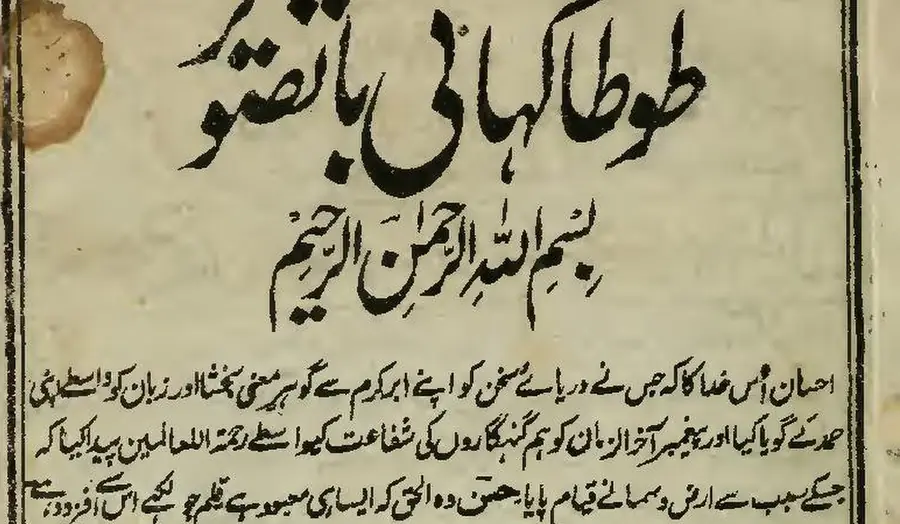
First body line, as printed (Wikisource transcription)
احسان اُس خدا کا کہ جس نے دریائے سخن کو اپنے ابر کرم سے گو ہرِ معنی بخشا اور زبان کو واسطے اپنی
- 9.1% of characters wrong
FastOCR
published by us
احسان اُس خدا کا کہ جس نے دریائے سخن کو اپنے ابر کرم سے گو ہر معنی بخشا اور زبان کو واسطے اپنی
- 9.2% of characters wrong
imagetotext.info
free web tool
احسان اُس خدا کا کہ جس نے دریائے سخن کو اپنے ابر کرم سے گو ہر معنی بخشا اور زبان کو واسطے اپنی
- 30.4% of characters wrong
OCR.space
default Engine 2
احسان أس مداكاكيج سنءريات سخن كواب ابركرم ← كوبر معى تختا اورزيان كوداسطيى
- 55.3% of characters wrong
Tesseract 5.5.4
the engine NewOCR says it uses
ا احمان اس دا اجس ےه در را سخ نکو ان ارک سےکوس ین یناد زا نک ری
- 99.6% of characters wrong
OnlineOCR.net
no Urdu option
tA)K11 tAirk.,....11.30,t4 ikitt r CIO 4 %;114iiii
% of characters wrong by script, lower is better
- FastOCR
- OCR.space Engine 3
- imagetotext.info
- OCR.space default Engine 2
- Tesseract 5.5.4 (the engine NewOCR says it uses)
- PDF24
- Chinese
- FastOCR 1.0%OCR.space E3: No scoreOCR.space E2 3.0%Tesseract 71.9%PDF24 3.2%
- Urdu
- FastOCR 9.1%OCR.space E3 19.6%imagetotext.info 9.2%OCR.space E2 30.4%Tesseract 55.3%PDF24 69.0%
- Bengali
- FastOCR 7.4%OCR.space E3 11.2%imagetotext.info 7.9%OCR.space E2 100.0%Tesseract 31.7%PDF24 18.6%
- Arabic
- FastOCR 2.6%OCR.space E3 2.9%imagetotext.info 2.9%OCR.space E2: Not supportedTesseract 20.4%PDF24 35.5%
- Tamil
- FastOCR 2.2%OCR.space E3: No scoreOCR.space E2 99.8%Tesseract 8.5%PDF24 9.2%
- English
- FastOCR 3.3%OCR.space E3: No scoreOCR.space E2 4.5%Tesseract 8.5%PDF24 10.1%
Photo of a page
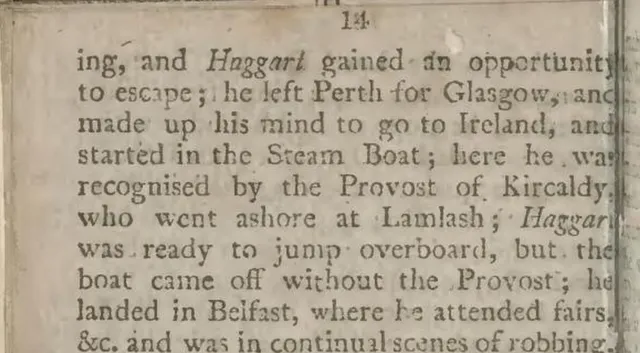 (opens full size)
Text FastOCR returned
ing, and Haggart gained an opportunity
to escape; he left Perth for Glasgow, and
made up his mind to go to Ireland, and
started in the Steam Boat; here he wa
recognised by the Provost of Kircaldy
who went ashore at Lamlash; HaggarWhich iPhone scanner app is the most accurate and the fastest?
None of the iPhone apps here was scored for accuracy or timed for speed, so this page names no winner on either. A claim of that kind needs the same page photographed in the same light and run through each app; we have not done that.
What we did measure is the web, which is what Safari reaches. Public-domain book scans, one per script, went through every free web OCR tool we could reach in late October 2026, and FastOCR's production API read the same pages. Each score is the share of characters that differ from the Wikisource text, so lower is better. The scripts shown on this page are Arabic, Urdu, Bengali, Tamil, Chinese and English.
Script mattered more than brand. On Urdu FastOCR got 9.1% wrong, Tesseract 55.3%; on English the two were close, 3.3% against 8.5%. More tools and every script are in best free OCR tools.
To rank iPhone apps yourself, test any OCR tool in 15 minutes shows how to count wrong characters on one page.
1. FastOCR in Safari (our tool)
- Best for
- Arabic, Hindi, Urdu, Persian or Bengali text, a scanned PDF, or a Word or Markdown file from a photo of a page.
- Watch out for
- It is a website, not an App Store app, so it needs a connection and uploads your file. Without an account a small daily image cap applies.
FastOCR has no iPhone app. Open Image to Text in Safari: on a phone the upload box has a camera button, which opens the rear camera, beside Choose file for your photo library or Files. A photo comes back as raw text and a one-page searchable PDF, with Word and Markdown downloads. Images need no sign-up and carry no watermark.
It reads 100+ languages and works out the language itself. Signed in, a finished image can be translated or tidied with AI Polish; neither runs on PDFs. A scanned PDF from Files comes back as a searchable PDF with a free account.
Apple describes Live Text as recognizing text with on-device intelligence. FastOCR uploads each file to be read, so keep sensitive pages in an on-device tool.
What the scan test showed: FastOCR was wrong on 2.6% of Arabic characters, 7.4% of Bengali and 2.2% of Tamil; lower is better.
2. Apple Live Text
- Best for
- Copying words from a photo already on a supported iPhone, in a language Apple names.
- Watch out for
- Apple names Chinese, Japanese, Korean and Thai on its iOS list; Arabic, Hebrew, Hindi, Urdu, Persian and Bengali are not named.
Live Text is the OCR already on the phone. Touch and hold a word in a photo, adjust the selection and copy it; Apple lists iPhone XS, XR or later with iOS 15 or later. Apple says the recognition uses on-device intelligence, which is a real advantage over any upload.
It gives you words to paste, not a file: the Apple instructions we read do not mention a searchable PDF. The full language and device comparison is on FastOCR vs Apple Live Text.
Source: Apple Live Text and Apple's language list, checked 4 November 2026.
3. Apple Notes scanner
- Best for
- Putting paper pages into a note on the phone.
- Watch out for
- Apple does not say the saved PDF is searchable, and its guide names no scripts.
In the Notes app, tap the camera icon in a note and choose Scan Text or Scan Documents. Scan Text drops recognized words into the note, in the languages Apple supports. Scan Documents saves the pages as a PDF inside the note.
We did not run Notes on our test pages, so there is no accuracy number for it.
Source: Apple's Notes scanning guide, checked 4 November 2026.
4. Google Lens
- Best for
- Translating a menu or sign from a photo you already took.
- Watch out for
- On iPhone it works from Google Photos or the Google app, not through the camera, and its pages name no scripts it reads.
Google's iPhone help says to open a photo in Google Photos, tap Lens and select words to copy them. Lens can translate text into all Google Translate languages, but that is a translation claim: the pages we read never list the scripts Lens can read in a photo.
We did not run Lens on our test pages.
Source: Google Lens and Google Search Help for iPhone, checked 4 November 2026.
5. Adobe Scan
- Best for
- Turning a stack of paper pages into searchable PDFs in a free scanner app.
- Watch out for
- Adobe's iOS settings say OCR does not run on scans longer than 25 pages for general users, and the language list does not name Arabic, Hindi or Urdu.
Adobe Scan is free to download. Adobe says its OCR creates editable, searchable PDFs and that scans can be saved as JPEGs. The recognition language defaults to the phone's language, and the settings page lists 18 languages, Chinese, Japanese and Korean among them. Adobe says a paid subscription lifts the scan length for OCR to 100 pages.
We did not run Adobe Scan on our test pages. Source: Adobe Scan and its iOS settings, checked 4 November 2026.
Microsoft Lens is gone
If an older guide sends you to Microsoft Lens, skip it. Microsoft's page says the app began retiring on 9 January 2026, left the app stores on 9 February and stopped new scans on 9 March. Microsoft suggests the scanner inside the OneDrive app, which keeps scans in OneDrive only.
Source: Microsoft Lens retirement, checked 4 November 2026.
The FastOCR Mac app is not an iPhone app
FastOCR also ships free, offline desktop apps for Mac and Windows, in public beta. They read files on the computer, export searchable PDF, text, Word and Markdown, and send nothing over the network. Neither runs on iPhone, and their results are not the website results above.
iPhone OCR library: the Vision framework or a server API
Writing an iOS app gives you two routes. Apple's Vision framework is the built-in one: you create a VNRecognizeTextRequest, run it on an image and read back the recognized text. Apple's page says to set the recognition languages on the request, and the framework reports the languages it supports in code, so check that list for your script before you commit. The request has been available since iOS 13.
A server API keeps the app small. The FastOCR REST API takes the image over HTTPS and returns text or a searchable PDF, with a free monthly allowance; a Python SDK, an MCP server for AI agents, and LangChain and LlamaIndex loaders use the same API. Vision works where there is no connection, while a server API reads 100+ languages with no model to ship but needs one.
Source: Vision text recognition, checked 4 November 2026.
Photographing a page so OCR reads it
1. Fill the frame with the page, so each letter spans more pixels. 2. Light it evenly; a shadow from your hand or phone across the lines costs accuracy in every tool. 3. Keep the phone parallel to the paper. A slanted shot squashes the letters. 4. Check names and numbers against the page whatever tool you use.
How we tested
- Timing: web tools were run on 31 October 2026 and the FastOCR output dates from 25 October. Vendor pages were read on 4 November 2026. We plan to re-run the test before January 2027 ends.
- Material: a single Wikimedia Commons book scan per script, public domain or CC0, checked against its Wikisource transcription.
- Scoring: we strip spaces, punctuation and Arabic diacritics, then count wrong characters; lower is better. Our own proofread key differs from Wikisource by 1% to 6%, so gaps under roughly 3 points are noise.
- Image size: FastOCR read Arabic, Urdu and English at 500 pixels wide; every other tool and page used 1,280 pixels.
- Tesseract 5.5.4 ran on a desktop with the right language pack. OCR.space ran on its public demo key.
- No iPhone app was tested, and nothing was timed.
When another tool is the better choice
- Your language is on Apple's Live Text list and the picture is a photo on the phone: Live Text needs no app and no upload.
- You scan paper into notes or PDFs all day: Apple Notes or Adobe Scan keep that in the phone.
- You are building an iPhone app: Apple's Vision framework ships with the platform.
FAQ
What is the best OCR app for iPhone?
It depends on the text. For a quick copy in a language Apple names, Live Text is built in. For Arabic, Hindi, Urdu, Persian, Bengali or a PDF, FastOCR works in Safari. We have not scored any iPhone app, so no app is named on accuracy.
Is there an OCR app for iPhone from FastOCR?
No. FastOCR is a website that works in Safari on iPhone, and nothing is in the App Store. The free Mac app is a separate, offline public beta for computers and does not run on iPhone.
Does the iPhone have built-in OCR?
Yes. Live Text recognizes text in photos, and Apple lists iPhone XS, iPhone XR or later with iOS 15 or later. You can copy, share, look up or translate the words. The Notes app can also scan text and documents.
What is the best free OCR scanner app for iPhone?
Live Text and the Notes scanner are free and already on the phone. Adobe Scan is free to download, and Adobe says OCR does not run on scans over 25 pages for general users. FastOCR is free in Safari for images, with a daily cap until you sign in.
Which iPhone scanner app is the most accurate and the fastest?
We do not know. We scored no iPhone app and timed nothing. We did score FastOCR and other web tools on scanned book pages: FastOCR got 9.1% of Urdu characters wrong and 3.3% of English ones, lower is better.
Does Apple Live Text read Arabic, Hindi or Urdu?
Not on Apple's published iOS list. It names Chinese, Japanese, Korean and Thai but not Arabic, Hebrew, Hindi, Urdu, Persian or Bengali. That is a statement about the list, not a test of Live Text on those scripts.
What is the best OCR library for iOS?
Apple's Vision framework is the built-in choice: VNRecognizeTextRequest finds and recognizes text in an image. To call a server instead, the FastOCR REST API returns text or a searchable PDF, and a Python SDK uses the same API.
Can I OCR a PDF on iPhone?
Open fastocr.org in Safari and upload the PDF; PDFs need a free account, and the result is a searchable PDF. Apple documents Live Text for photos and video, and its Notes scanner saves paper scans as PDFs, but neither is documented for existing PDFs.
Method
Vendor facts were read on each vendor's own pages on 4 November 2026; anything a vendor leaves out is shown as Not stated, never as No. No iPhone app was run and nothing was timed. The scan test counts wrong characters against the Wikisource text (lower is better), one public-domain page per script, for the web tools we could reach. Details are in how we tested.
Change log
- 18 July 2026: First published.
- 1 November 2026: Rewritten: sourced Apple, Google, Adobe and Microsoft facts, scan accuracy test.
- 4 November 2026: Moved to the shared comparison template; added the Apple Notes scanner and a per-tool table, and re-read every vendor page.